Beacon how-to · November 2026
Fix a shift after it's over
A lead forgot to log lunch, tapped a pallet by mistake, or couldn't find the next PO in Changeover. Here is what you can fix yourself in Shift Review, and what to send to John.
- v2.174.0
Screenshots are from Beacon's test site. POs DEMO-101 and DEMO-102 are demo data, not real production numbers.
1. What you can fix yourself
| What went wrong | What to do |
|---|---|
| The lead forgot to log lunch. | YouClick Add lunch on the line in Shift Review and give its start time. Steps |
| The lead forgot to log a break. | YouBreaks are paid at Ferrara, so the posted hours are already right. To keep efficiency right, click Add break. Steps |
| Downtime was logged by mistake: a scheduled break, or a stop that was really the changeover. | YouIn the line's Close Out, find it under Logged downtime and click Remove, lower the minutes, or change the reason. Steps |
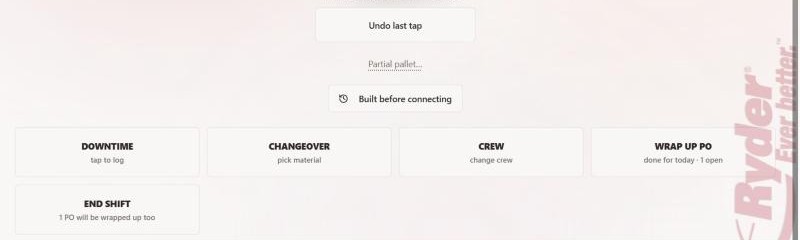
| A pallet was tapped by mistake and the line is still on that PO. | LeadPress Undo last tap on the tablet right away. Where |
| Units or pallets are wrong on a PO that was already changed over, wrapped up or closed. | YouType the right number in the PO's row in the Close Out box. Steps |
| The next PO isn't in the Changeover list, so its production was never logged. | YouAdd it as a missed run in the line's Close Out, with its times, crew, units and pallets. Steps |
| Hours were posted to a PO that didn't run. | BothJohn takes the PO off the line. Then you re-post and tick Remove it. Steps |
2. On the tablet, during the shift
Most mistakes are easiest to fix while the line is still running. Share these with your leads:
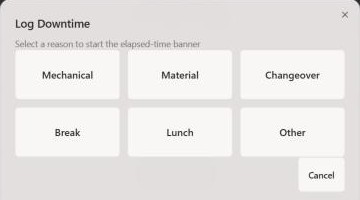
- Log lunch when it starts. Tap DOWNTIME, then Lunch. Tap End Downtime when the crew is back. If nobody ends it, Beacon ends a lunch by itself after 30 minutes.
- Log the end-of-shift break the same way: DOWNTIME, then Break.
- Tapped a pallet by mistake? Press Undo last tap right away, before CHANGEOVER or WRAP UP PO. After the line moves to another PO, Undo can't reach the old one.
- Next PO not in the Changeover list? Don't keep building on the PO that is on the screen. Every pallet tapped is counted to that PO. Call the coordinator.
3. Fix a missed lunch
Ferrara doesn't pay lunch. When a lead logs Lunch, Beacon takes it off the posted hours by itself.
The older way: when you close the line, lower the active time by the lunch minutes.
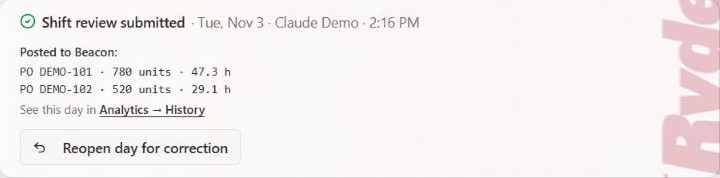
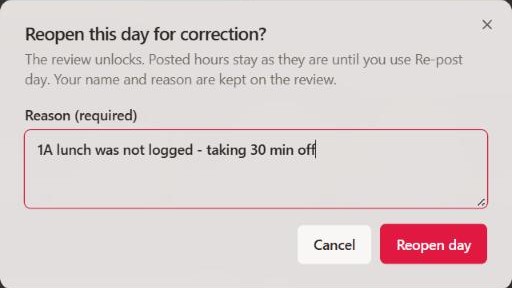
Step 1If the day is already submitted, reopen it
At the bottom of Shift Review, click Reopen day for correction. Type why, then click Reopen day. The posted hours stay as they are until you re-post.
Step 2Open the line's Close Out
- Line still running: in the list at the top of Shift Review, click Close & adjust here.
- Line already closed: scroll the table to the right and click Reopen on the line's row. Then click Close & adjust here.
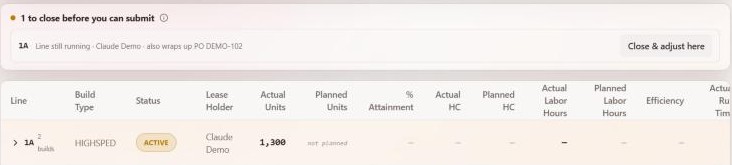

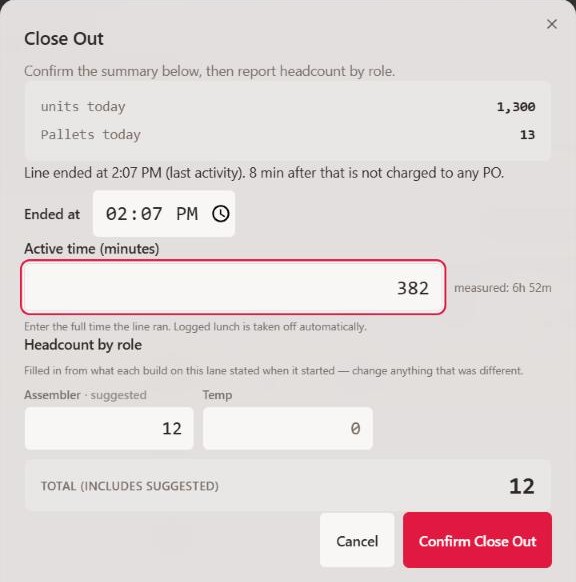
Step 3Take the lunch off the active time
The Active time (minutes) box starts at the measured time, shown beside it (“measured: 6h 52m”). Type that number minus the lunch. Leave the headcount as it is filled in, unless it is wrong. Click Confirm Close Out.
Step 4Re-post the day
See Re-post the day. If the day was never submitted, click Submit Shift Review instead.
4. Send these to John
You can now fix units, pallets, a missed lunch or break, downtime logged by mistake, and a run that was never started yourself (how). Beacon has no way yet for you to move or delete a run the tablet started, or move a pallet to another day. For those, send John:
- the date and the line
- the PO and the right number of units
- the start and end time of each PO
- the crew: how many people, by role
- anything else logged wrong, such as a lunch or a break
John fixes the line's data. Then you finish it: Close & adjust here if the line is still open, then re-post the day.
5. Re-post the day
- Click Re-post day at the bottom of Shift Review.
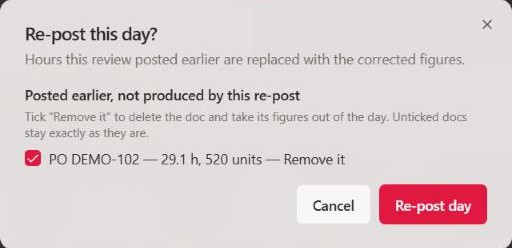
- If a PO was posted before but is no longer part of the day, the box lists it under “Posted earlier, not produced by this re-post”. Tick Remove it to delete it. Anything you don't tick stays as it is.
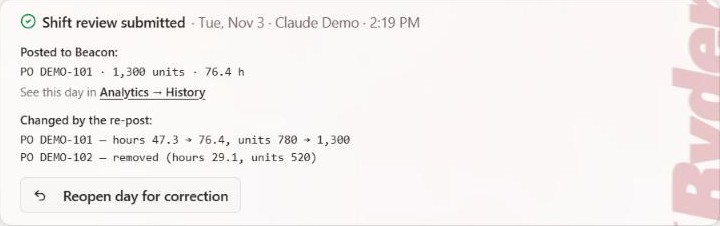
- Click Re-post day in the box. The receipt shows what changed.
- After a re-post, the corrected synopsis email is ticked. Untick it if you don't want it sent.

6. Nov 2: what was fixed
What went wrong on 1A. The lead couldn't find the next PO in Changeover. That was a Beacon bug, not the lead. The PO had an old closed copy from October, and Beacon read the whole order as finished, so it hid it. That is fixed in v2.175.0. Because of it:
- the first PO showed 532 units instead of 360
- the second PO's 272 units were never logged
- the PO pulled forward from later in the week got its 2:00–3:15 pallet (77 units) counted on Nov 3 instead of Nov 2
- 1 unit was posted to a PO that didn't run that day
Separately, no line logged lunch, and no line logged the end-of-shift break. On 6B that was 30 minutes for a crew of 16.
What John fixed in Beacon's data
| 1A on Nov 2 | Now in Beacon |
|---|---|
| 7:15–11:00 | First PO, 360 units |
| 11:00–11:30 | Lunch |
| 11:30–2:00 | Second PO, 272 units, break 1:30–1:45 |
| 2:00–3:15 | Pulled-forward PO, 77 units |
- Lunch added on 1A, 4A, 6A and 6B. The end-of-shift break added on 1A, 6A and 6B.
- The 1 unit posted in error was taken off.
- Nov 3: the pulled-forward PO went from 220 to 143, because its first 77 units now count on Nov 2.
What's left for you
- Open Shift Review for Nov 2. If it still says the day is submitted, click Reopen day for correction first.
- 1A is still open. Click Close & adjust here.
- Check the box shows about 709 units, the line ending at about 3:15 PM, and about 480 minutes of active time. Lunch is already logged, so don't take anything off. Click Confirm Close Out.
- Click Re-post day. Tick Remove it for the 1-unit PO, then Re-post day.
- Send the corrected synopsis email if you want it to go out.