Beacon how-to · November 2026
What's new: v2.175.0
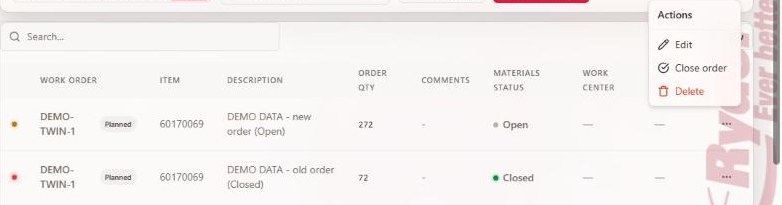
History has a new Weekly Synopsis. And an open order now shows in Start Line and Changeover even when an old, closed order has the same PO and item, which was the Nov 2 bug on line 1A.
- v2.175.0
Screenshots are from Beacon's test site. POs DEMO-TWIN-1, DEMO-RUN-3 and DEMO-CLOSED-2 are demo data, not real orders.
1. Patch notes
v2.175.0 Nov 6, 2026
- New: Weekly Synopsis. History → Synopsis → Weekly Synopsis shows a Monday to Sunday week: totals, a day-by-day table, and breakdowns by SKU, line and order. Each day is that day's Daily Synopsis, added up. More
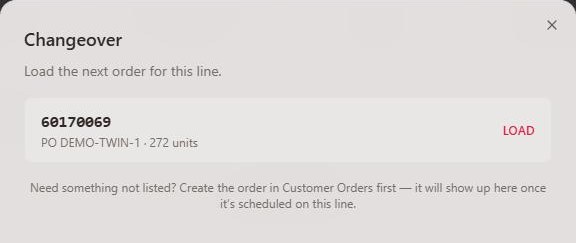
- An open order is no longer hidden by an old closed copy. When one PO and item had an old Closed order and a new Open one, Beacon read the whole order as finished. Start Line and Changeover hid it. Now one open order is enough to show it. What the line sees
- Hours land on the open order. When you post hours for a PO with two orders, the built total goes on the open one, not on the old closed one.
- Nothing changes for a PO with only one order. A closed order still stays out of Start Line and Changeover.
2. Weekly Synopsis
Open History → Synopsis → Weekly Synopsis. It opens on last week; the arrows step back, or forward up to this week. Leads and above can email it to the same list as the Daily Synopsis.
The full how-to, with screenshots: Weekly Synopsis.
3. Why one PO can have two orders
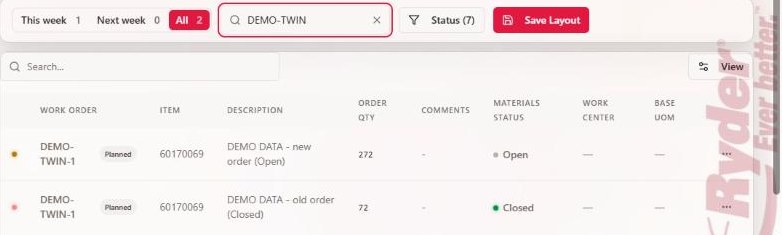
A schedule upload skips a PO that is already open in Beacon. A PO whose order is closed is added again as a new order, so a PO that comes back on a later schedule gets a second row.
4. What the line sees now
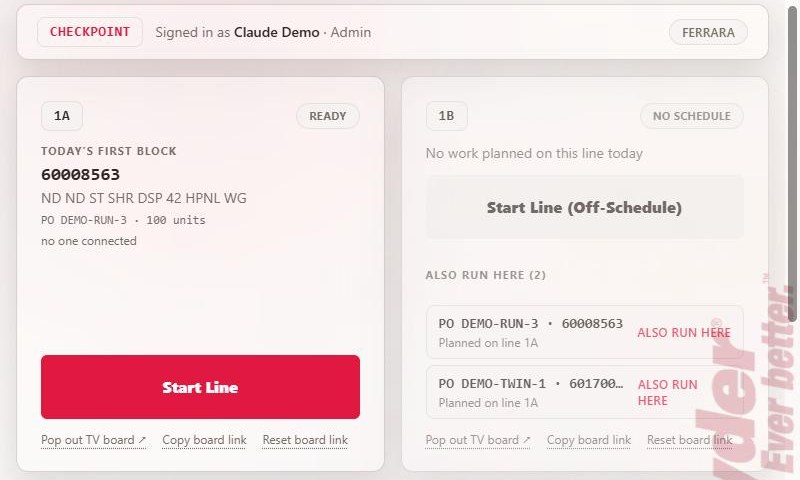
In the demo, line 1A has three orders planned today: DEMO-RUN-3, DEMO-TWIN-1 (the PO with two orders) and DEMO-CLOSED-2 (one order, closed).
5. Close it when it's done
For a PO with two orders, Beacon can't tell from posted hours how much of the new order is built. The old order's output may be in that total too. So once a day is posted, a finished order of this kind keeps showing in Start Line and Changeover until someone closes it.
Shift Review's Close finished orders? has no checkbox for a PO with two orders. Close it from Customer Orders:
- Open Build Schedule → Customer Orders. Click All and search for the PO.
- On the Open row, click ···, then Close order.