Meridian guide
Reopen a submitted internal audit
An admin who holds the site can reopen a submitted audit with a written reason. The earlier submission stays on record, and the next submission is a new revision.
Know who can reopen it
Only an admin who holds the site can reopen a submitted audit. A site manager, the SQF practitioner or a contributor cannot, and the button is not shown to them. An admin who does not hold the site is not offered it either.
Press Reopen audit
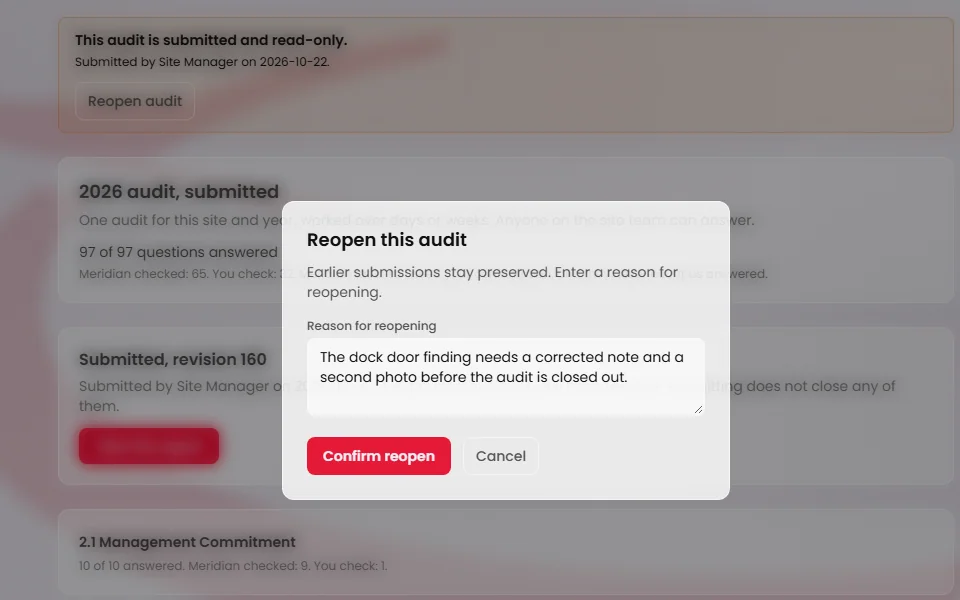
Open the submitted audit. A box at the top reads “This audit is submitted and read-only.” and says who submitted it and when. Press Reopen audit.
Write the reason
A box titled Reopen this audit opens. It says earlier submissions stay preserved. Type why in Reason for reopening. Confirm reopen stays greyed out until you have written one. Press Confirm reopen, or Cancel to leave the audit submitted.
Meridian records who reopened the audit, when and why. If Meridian refuses, the box shows its message and keeps your reason.
Correct the audit and submit again
The audit is a draft again. The Report and submission panel reads “Reopened. Last submitted: revision 1”, with the number of the last submission, and the answers and the floor walk can be edited. On Audit Readiness the badge reads Reopened.
The earlier submission and its report stay. The audit home's View revision button (with its number) and the Version of the audit list in the report still open them. Submit as usual and the next submission is recorded as a new revision. See Submit the internal audit and print its report.