Meridian guide
Read the footer on a printed page
Every printed page of a document, form, filed copy or binder carries a control footer. See what it says and why a page reads Not approved.
Print a document
Press Print on a document's page, print a module's documents, or print the audit binder. In Chrome or Edge 131 and later, every printed page carries a footer in its bottom margin.
Tip
Firefox and Safari cannot print the footer. There, a printout ends with one line that includes Generated by Meridian and the build, and it has no page numbers. Print from Chrome or Edge.
Read the footer
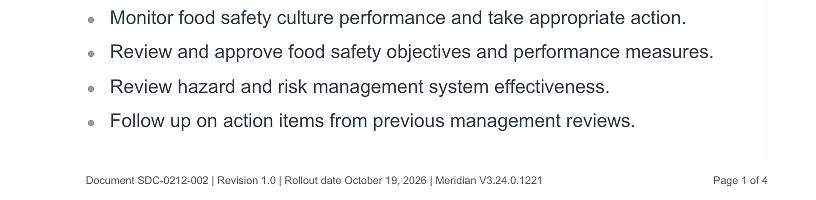
The left side reads Document, Revision and Rollout date, then the Meridian build. The right side reads Page X of Y.
Document is the document number. Revision is the document's version. Rollout date is the day that revision was approved with Approve & sign, or renewed with Mark Review Complete. Mark Review Complete moves the date and keeps the revision.
Find out why a page reads Not approved
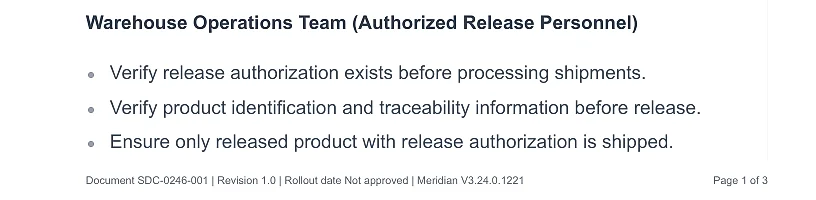
Rollout date reads Not approved when the content on paper has no current approval. That happens for a Draft, for a document edited since it was signed, for a document nobody has signed since signing began, for a form whose annual review has fallen due, and for a form while it is Under Review.
To fix it, site leadership uses Approve & sign or Mark Review Complete. Then print again. Paper printed before this release will not match new prints.
Tip
Not recorded appears when an approved document's signature has no readable time.
Filed copies and binders
A filed copy prints the revision and the approval date it was filed under, not the form's facts today. It reads Not approved if the form had no approval when it was filed, and Not recorded for a copy filed before these facts were kept.
In a binder or a printed module, each document's pages carry that document's own number, revision and date. The page numbers count the whole print job, so a document in the middle reads, for example, Page 37 of 412. A page that belongs to no document, such as the contents or a divider, carries only the build and the page number.
QR signs, posters, binder spine labels and Meridian's readiness report are not controlled documents. They carry no footer.