Meridian guide
Print the Approved Supplier Register
Open the generated list of your suppliers, read its columns and its Attention column, print it, and know what Not available means.
Open the register
The Approved Supplier Register is a controlled document in module 2.3. Add it first with the banner on the Documents page if your site does not have it.
Its list is generated from the supplier records on the Suppliers page each time the register is opened or printed. It is read-only here. To add a supplier, change one or attach a certificate, use the Suppliers page. Nothing in the table is stored on the document.
Read the list
Each row is one supplier, with its type, what it supplies, its contact, risk level, status, evidence, last review, next review and what needs attention.
Approved suppliers come first, then Conditional, Emergency only, Not yet approved and Not approved, and each group is sorted by name. Evidence lists the certificates and approvals still in date, with the day each expires, or None current.
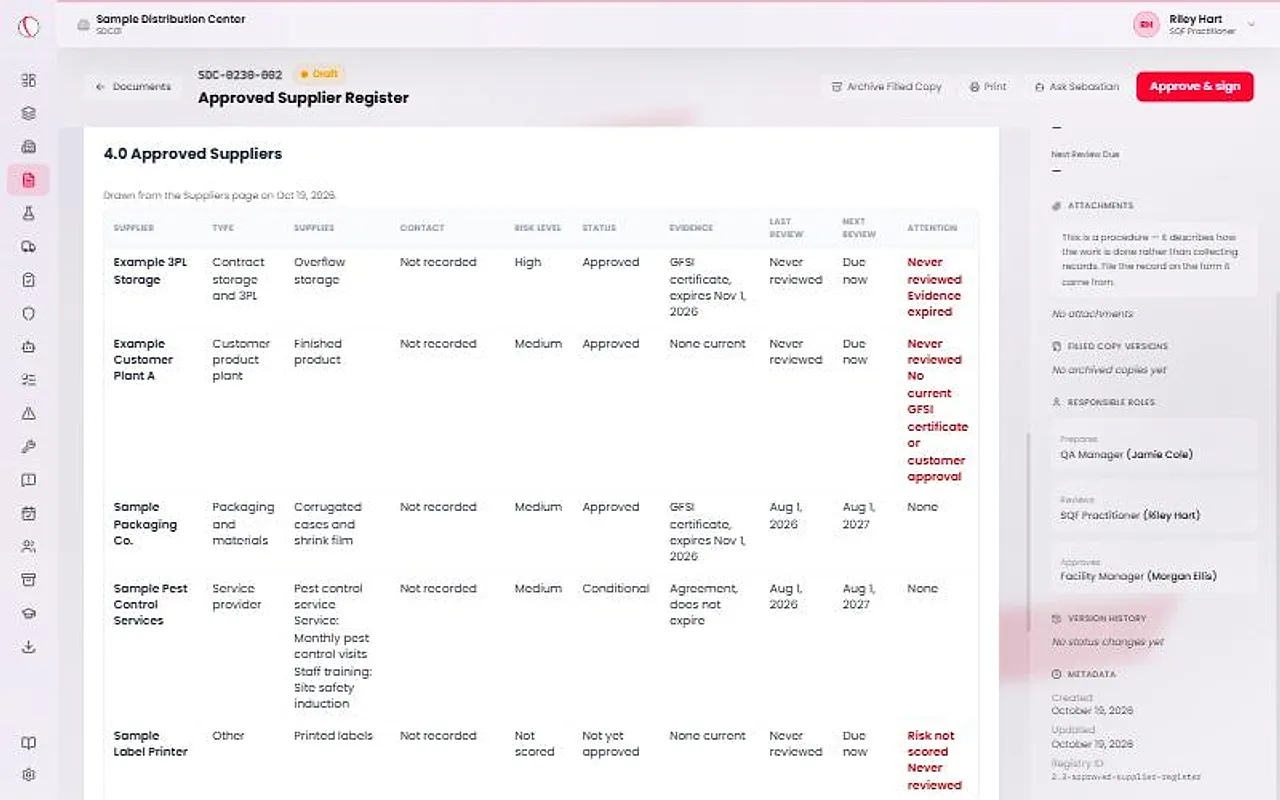
Read the Attention column
Attention says what needs doing today: Risk not scored, Never reviewed, Review overdue, Evidence expired, or, for a customer's product plant, No current GFSI certificate or customer approval. A supplier with nothing to do reads None.
Approve and print it
Site leadership presses Approve & sign. That approves the format of the register, not the list. The list is whatever the supplier records hold on the day it is drawn, and it prints the day it was drawn.
Press Print. A past day's list cannot be reproduced. What Meridian keeps is the supplier records, their reviews and their evidence.
Know what Not available means
If the supplier records cannot be read, or the register is drawn away from the page, as in the audit binder export, the table says Not available instead of a list. Reload the page to try again.
Never read a blank or missing list as “the site has no suppliers”. A site with no suppliers entered sees “No suppliers have been entered on the Suppliers page for this site yet.”