Meridian guide
Choose the official internal audit
A year can hold several internal audits. Choose which one is the year's official Internal Audit, when you submit or later, and replace it with a written reason.
Why one audit is official
Since 3.31.0 a year can hold several internal audits. Start a new audit always starts a new one, and the earlier audits of that year are kept and stay readable.
One of them is the year's official Internal Audit. Audit Readiness, Sebastian and the year's record use the official audit. A year with audits but none chosen as official is not done.
An admin, a site manager or the SQF Practitioner chooses the official audit. A contributor can start, answer and submit an audit, and it then waits to be chosen.
Read the audit list
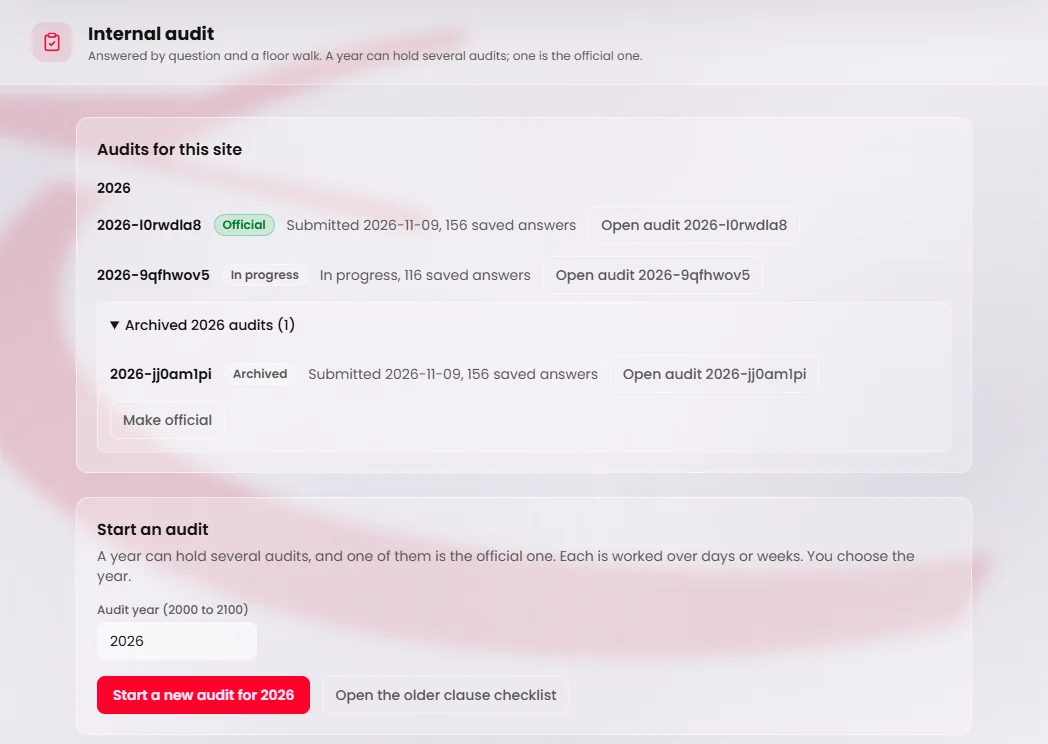
In the sidebar, open Audits and choose Internal Audit. Audits are grouped by year, and each one has a badge.
Official is the year's official audit. In progress is still being answered. Waiting to be chosen is submitted, in a year with no official audit yet. Archived is submitted while another audit of the year is official.
Archived audits sit in a closed group under the year, for example Archived 2026 audits (1). Open it to read them or to make one official.
Choose when you submit
When an admin, site manager or SQF Practitioner presses Submit audit, the box asks Make this the official 2026 Internal Audit? with the audit's year.
Yes submits the audit and makes it the official one. No submits it and leaves the choice for later. Cancel keeps the audit as it is.
If another audit is already official, the box names it and asks Why does this audit replace it?, and Yes needs a reason. If the audit is already the official one, for example after it was reopened, the box says it stays official and offers Confirm submit.
A contributor sees the usual confirmation and a line saying “A site manager, SQF Practitioner or admin chooses the official audit.”
Make an audit official later
A submitted audit that is not official has a Make official button, in the audit list and on the audit's home. The official audit's home says, for example, “This is the official 2026 Internal Audit.”
When the year has no official audit yet, press Make official and it is chosen. The audit list reads the choice again and moves the other submitted audits of that year to Archived.
Replace the official audit
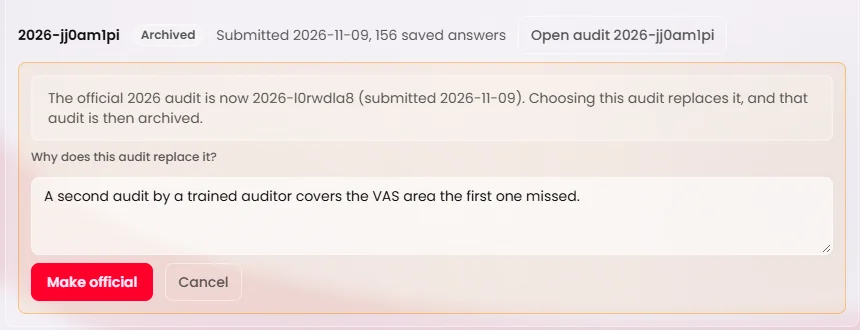
Press Make official on an Archived audit. The box names the audit that is official now and says that choosing this one replaces it, and that the replaced audit is then archived.
Type why this audit replaces it under Why does this audit replace it?. Make official stays greyed out until there is a reason. Press Make official.
Every choice is kept with who made it, when and the reason, including the ones that were replaced.
Caution
If another audit was made official while the box was open, Meridian says so and nothing is replaced. Check which audit is official now, then choose again.
Check Audit Readiness
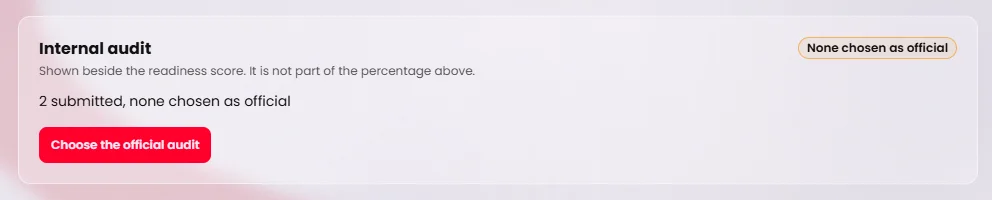
The Internal audit panel on Audit Readiness reports on the year's official audit. When the year has audits but none chosen, its badge reads None chosen as official, it says how many submitted audits are waiting, for example 2 submitted, none chosen as official, and Choose the official audit opens the audit list.
While the only audits of the year are still in progress, it reads An audit is in progress, none chosen as official.
Audits from before 3.31.0
An audit submitted before 3.31.0 was made its year's official audit when 3.31.0 was released. Nothing needs doing for it.
An audit that was still in progress then is chosen when it is submitted, like any other.