Meridian guide
Check your audit answers with Sebastian
Have Sebastian check each internal audit answer against its clause, fix a flagged answer or keep it with a reason, clear the review before you submit, and (admins) enter the certification body's comment.
Know which audits are checked
Answer checks appear on audits started from Meridian 3.30.0 on. An audit that was already in progress, or an older audit that is reopened, submits as before and shows no check buttons.
A check is advice. Sebastian says whether an answer covers its clause, but a person decides what to save. Sebastian never suggests answer text.
Check one answer
Under each clause, on the question cards and on the floor walk, press Check this answer. Sebastian reads the saved answer, so save the card first. Until then the panel says “Save this card first. The check reads the saved answer.”
The result is one of four: Covers it, Covers it only partly, Does not cover it, or Could not be graded. For a partial or missing answer the panel lists the parts of the clause the answer does not address, what is missing, and whether the file you cited supports what the answer says. A Not applicable is checked too: its Basis is read against the clause.
The result is kept, so a reloaded page still shows why a row was flagged.
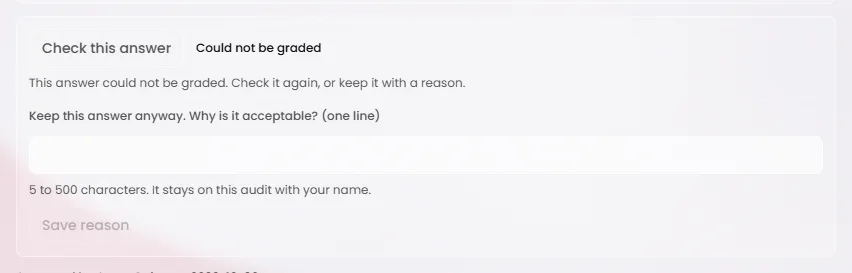
Taken in Meridian's test mode, which cannot reach the grader, so the result reads Could not be graded. At a site, a checked answer reads Covers it, Covers it only partly or Does not cover it, and a partial or missing answer lists what is not addressed, what is missing and whether the cited file supports it. Tip
When a cited file is a photo or an upload with no readable text, the written answer is checked on its own and the panel says so. The rating is not lowered for the file.
Check again after a change
A check holds for the answer as it was checked. If the verdict, the note, a Basis, an item seen or a cited file changes, the panel says “Out of date - check again.” and the answer counts as not reviewed until it is checked again.

Review the whole audit
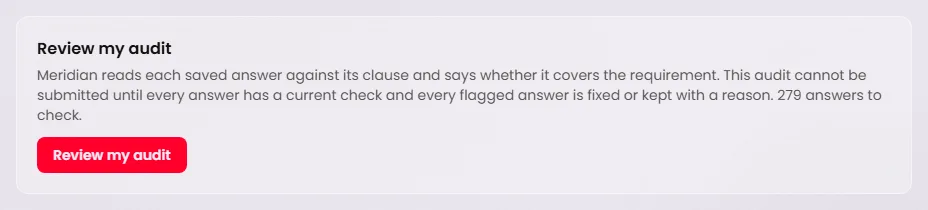
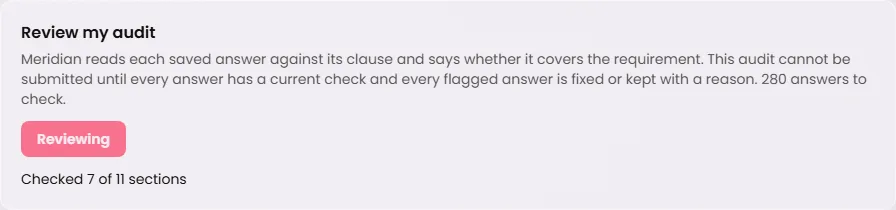
On the audit home, the Review my audit panel says how many answers there are to check. Press Review my audit. Sebastian checks the answers section by section and shows its progress, for example “Checked 7 of 11 sections”. Answers that already have a current check are not sent again.
When it is done, the panel says how many answers it checked. If a section could not be checked, the panel names it with the reason and offers Retry the sections that failed.
Fix a flagged answer, or keep it with a reason
An answer is flagged when it covers the clause only partly, does not cover it, or could not be graded. Either fix it: edit the answer, let it save, and press Check this answer again. Or keep it: type one line in Keep this answer anyway. Why is it acceptable?, between 5 and 500 characters, and press Save reason.
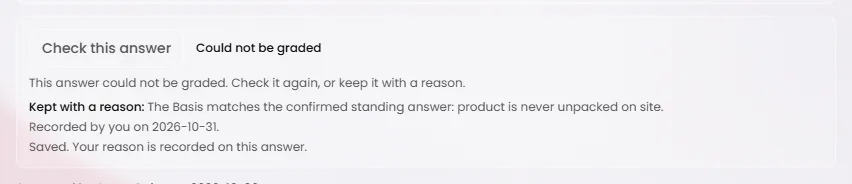
The panel then reads Kept with a reason, with your reason, who recorded it and the date. The reason stays on this audit with your name.
A kept answer holds only for the result you saw. If the answer changes, or a later check rates it differently, it must be looked at again. An answer that could not be graded can always be kept with a reason, so a grading outage never stops a submit.
Tip
A reason kept for a partly covered or uncovered answer can help Sebastian check other sites' answers, with site, customer and people names removed first. A reason kept for an answer that could not be graded teaches nothing.
Clear the review before you submit
The Report and submission panel on the audit home counts the answer checks that stop the audit being submitted, under Not reviewed yet, Changed since it was reviewed, and Flagged - fix it or keep it with a reason. Each line names the clause and links to its row.
When nothing is left, the panel says “Every answer has a current check, and every flagged answer is fixed or kept with a reason.” Submit checks the same list again on the server and refuses anything still on it.
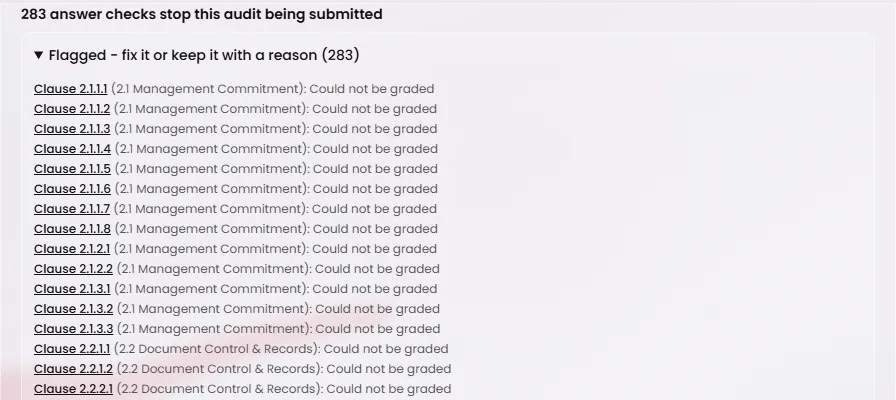
Taken in Meridian's test mode, where every check reads Could not be graded. At a site the lines show each flagged answer's own result. Enter the certification body's comment (admins)
When the certification body comments on a submitted audit, an admin who holds the site can record it so later checks learn from it. Open the report of the latest submitted revision. Its Certification body comment panel asks you to paste what the certification body said.
Paste the comment into The comment and press Find the rows it is about. Meridian proposes the rows. Check every line before anything is saved: tick the rows to include, choose what the certification body said about each (The answer was adequate, Accepted without remark, Covered it only partly, or Did not cover it), and write the reason. Then press Confirm and the number of rows.
The examples are taken from the submitted answers, never from what is typed on the screen, and site, customer and people names are removed before they are shared with other sites.
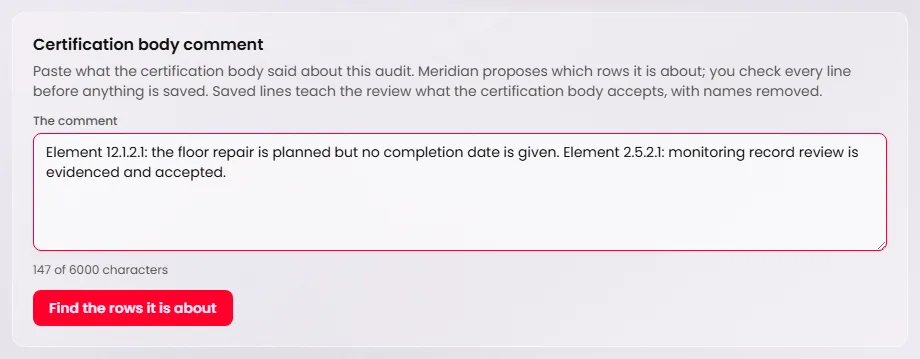
Taken in Meridian's test mode, which cannot reach the model that reads the comment, so pressing Find the rows it is about there says the comment could not be read. At a site the proposed rows appear below the comment, each with a tick box, what the certification body said and a reason, followed by Confirm and the number of rows. Caution
Only the latest submission takes a comment. On an earlier revision the panel says “Enter the certification body comment on the latest submission.” A draft or reopened audit has no submitted answers for a comment to be about.
Know what prints
Nothing from the answer checks prints. The report and its printed copy show the audit's answers only, not the checks, the flags or the reasons for keeping an answer.
