Meridian guide
Answer Yes or No for each operation
Tell Meridian which operations your site performs and which it does not, so it can propose Not applicable for the requirements that depend on them.
Open the Operational Profile
In the sidebar, open Food Safety System and choose Site Profile, then open the Operational Profile section. Find Operations Performed. It lists Storage, Recoupment, Repack and Value-Added Services (VAS). Site Setup shows the same question in its Operational Profile step.
Site leadership (an admin, a site manager or the SQF practitioner) sets these answers.
Answer each operation
Every operation has two choices, Yes and No. Choose Yes if the site performs the operation and No if it does not. Until you choose, the row reads Not answered yet. Clear, beside an answer, puts it back to blank.
Blank means not answered. It is never read as No.
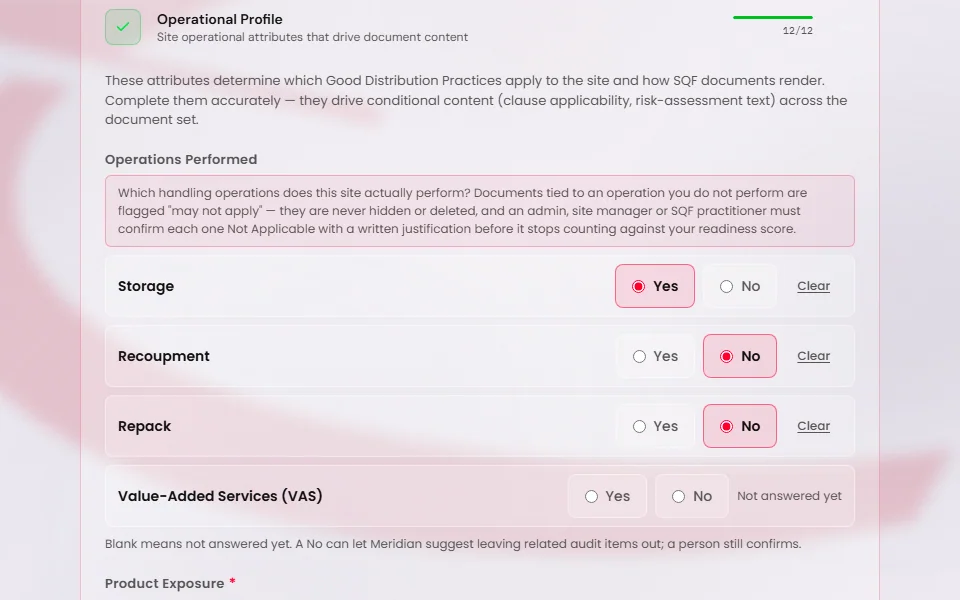
Answer No for what the site does not do
If your site does not do an operation, answer No. Meridian can act only on a No you have given. A blank tells it nothing.
A No lets Meridian propose Not applicable for the requirements that depend on that operation, for example 2.4.6.1 when Repack and Recoupment are both No. Meridian only proposes. A person confirms each one in the internal audit.
Existing answers are unchanged, and nothing is filled in for any site. Each site answers for itself.
Caution
Answer what is true for the site. Once someone confirms it, a Not applicable takes the requirement out of what the audit asks.
Save the answers
Press Save Changes at the top of the Site Profile page. The button reads Saved when it is done.
See what a No does
In the internal audit, a clause that depends on the operation says “The standing answers say this may not apply” and shows your answer. Press Confirm Not applicable to accept it, or answer the clause yourself.
On the floor walk, when Recoupment, Repack and Value-Added Services (VAS) are all No, a note suggests switching VAS Area off. You still press Save areas.
Answering No also makes earlier Not applicable decisions due for review. A clause you confirmed earlier can read “Standing answer changed - check this clause again” until you decide again.