Beacon how-to · November 2026
Margin by SKU
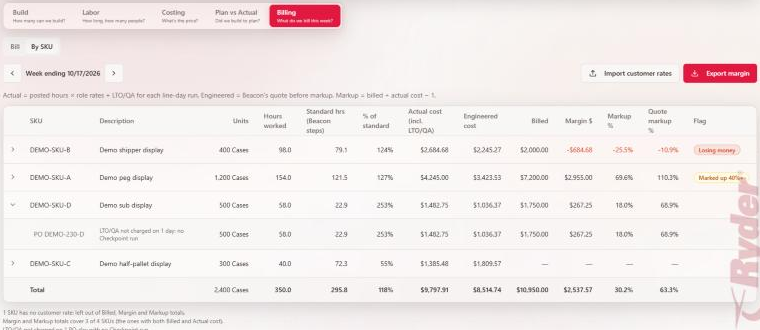
A weekly view, SKU by SKU: hours worked against Beacon's standard, what the labor cost, what Beacon's own quote says it should cost, and what the customer was billed. It shows the margin and the markup, and flags SKUs that lose money or are marked up 40% or more.
- v2.178.0
1. What it shows
One row per SKU for one week, Sunday to Saturday. That is the same week as the bill, so the Billed column matches the weekly bill to the cent.
| Column | What it means |
|---|---|
| Units | Finished units posted in Shift Review that week. The same quantity the bill charges. |
| Hours worked | Hours posted for the SKU's POs, every role. |
| Standard hrs (Beacon steps) | What Beacon's steps say those units should take. Not the cases-per-hour typed on the SKU. |
| % of standard | Hours worked ÷ standard hours, leaving out changeover and morning start-up hours, like History's CPLH and Plan vs Actual. Those hours still count in cost. Over 100% means the SKU took more hours than the standard. Under 100% means it took fewer. |
| Actual cost (incl. LTO/QA) | Posted hours × role rates, plus LTO/QA for the SKU's own Checkpoint run time, less unpaid downtime such as lunch. A line-day never pays more than one paid shift of LTO/QA. |
| Engineered cost | Beacon's own quote before markup: steps × role rates + indirect % + LTO/QA. |
| Billed | Units × the customer rate. |
| Margin $ | Billed − actual cost. |
| Markup % | How far billed is over actual cost. Cost $10, billed $14 = 40%. |
| Quote markup % | How far billed is over the engineered cost: is the price right against our own standard? |
Leads and above, the same people who see the Billing tab. Workers, Viewers and board links do not.
2. Open it
- Click Analytics → Analytics, then the Billing tab.
- Click By SKU at the top. Bill takes you back to the bill.
- Use the arrows to pick the week. The week is named by its Saturday:
Week ending 10/17/2026
.

3. Read a row
Example from the demo week: DEMO-SKU-A built 1,200 units. Labor cost $4,245.00 and the customer was billed $7,200.00. Margin $2,955.00, markup 69.6% over cost, so it is flagged Marked up 40%+.
The two flags
- Losing money (red): billed is less than the actual cost.
- Marked up 40%+ (amber): billed is 40% or more over the actual cost.
Flagged rows sit at the top. Click any column header to sort by it.
Open a SKU to its POs
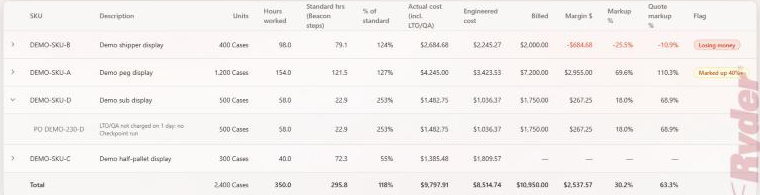
Click the arrow on a row to see each PO behind it. A PO posted on a day with no Checkpoint run says LTO/QA not charged on 1 day(s): no Checkpoint run
, because Beacon cannot tell which line it was on.
When a number is “—”
Beacon shows — instead of a guess, never $0. Hover it to see why:
No customer rate for this SKU
: Billed, Margin and Markup stay empty and the SKU is left out of those totals.No Beacon steps to quote this SKU
: no engineered cost.No hours posted for this SKU
: units were posted with no hours, so there is no actual cost.
Under the table, a short list says how many SKUs were left out of each total.

4. Load the customer rates first
Billed comes from the customer rates. Until an Admin imports them (Import customer rates on the Billing tab, the rate workbook's SKU and Correct Rate columns), every Billed, Margin and Markup reads — and the screen says so.
Customer rates come from Analytics → Analytics → Billing → Import customer rates (Admin). A SKU that is not in the rate table shows — for Billed, Margin and Markup. An import adds or changes rates. It never deletes any.
5. Export it
On By SKU, click Export margin. The Excel file has a Margin by SKU sheet and a POs sheet. It is a separate file from the bill: the bill you send the customer never carries cost or margin.
6. Check it by hand
Pick one SKU and its week:
- Billed: add up that SKU's Charge on the Bill view. It is the same number.
- Posted labor: hours per role from Shift Review × that role's rate in Settings → Labor Rates.
- LTO/QA: take the PO's Checkpoint run time on that line and day, less unpaid downtime such as lunch. Charge those hours for each fixed role in Settings → Labor Rates: its rate × its people per line, plus the indirect % if your site has it on. A line-day never pays more than one paid shift: if its runs add up to more, each PO's share shrinks in proportion to its minutes. A role that posted its own hours that day is not charged again.
- Markup: billed ÷ actual cost − 1.
Numbers move when a step, a role rate or a customer rate changes: everything is worked out when you open the screen.