Beacon how-to · November 2026
The end-of-shift report: Downtime, Lunch and Break, and changeover minutes
The end-of-shift report (the Daily Synopsis, on screen and in the email) is shorter and says each thing once. Downtime lists the time the line was stopped: real stoppages, and any Break that was logged. Lunch has its own plain line. The changeover minutes are the ones Beacon actually charges to the PO: the same minutes that go into the hours, the rate and Plan vs Actual.
- v2.186.0
1. What's new
- Four sections are off for Ferrara: Production Units, Work Orders Summary, Materials Breakdown and Line Performance. The Shift Review table already shows what they showed. Which ones and why
- Lunch is out of Downtime. A Break that was logged is in it. The two scheduled breaks are already out of the shift's hours, so crews do not log them. Any Break that is logged was extra, so it counts as downtime. Example
- Lunch reads plainly: “Lunch 30 min”, in its own column called Lunch. There is no Break line and no Add break button any more. All the wordings
- A logged Break now counts against efficiency. Only Lunch comes off a line's labor hours. How much it moves
- The Changeover column shows the minutes Beacon charges, not the time that passed between two POs. How they are worked out
- Pay, posted hours and rates do not change. What changes is what the report and Shift Review show: Downtime, Actual Labor Hours and Efficiency. Questions
Fig. 2 to 5 are from Beacon's dev site: demo line 4A, demo POs (DEMO-…), a made-up day. Fig. 6 and 7 are Ferrara's real November 9 report drawn for v2.186.0, with PO numbers replaced by DEMO-… and item numbers hidden. They were drawn before a Break counted as downtime, so their Break/Lunch column reads differently from the live report. The Settings picture is also from the dev site.
2. Four sections are off at Ferrara
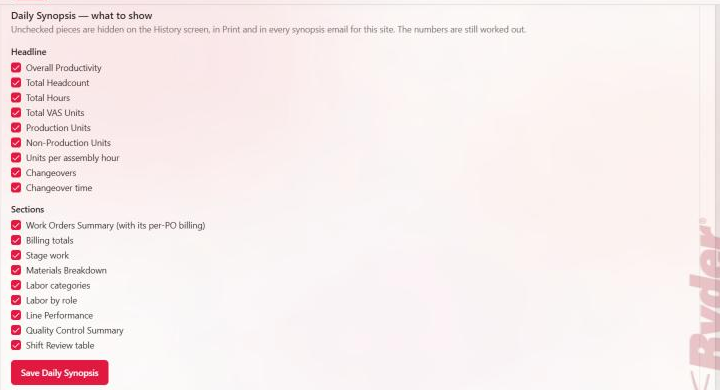
Ferrara asked for a shorter report. These four no longer show on the History screen, in Print or in the email:
| Section | Why it can go |
|---|---|
| Production Units (top tile) | At Ferrara every unit is production, so it showed the same number as Total VAS Units, twice. |
| Work Orders Summary | Each PO's units, hours and plan are in the Shift Review table, one row per PO. |
| Materials Breakdown | The same POs grouped by item. The Shift Review table already shows each one. |
| Line Performance | Each line's units, hours and run time are the line rows of the Shift Review table. |
The day's numbers do not change. Beacon still works every section out; it just leaves these off the report. Other sites keep every section until their Admin turns one off (Fig. 1).
To turn a section back on (Admins)
- Open Settings → Email and find Daily Synopsis — what to show.
- Tick the section you want back. Untick one to hide it.
- Click Save Daily Synopsis. The next report, on screen and in the email, follows the list. Reports already emailed do not change.
Only Admins can change the list. It is one list for the whole site: everyone who opens or receives the report sees the same sections.
3. Downtime: stoppages, and any Break that was logged
The Downtime column is for time the line was not running that needs a look: Mechanical, Material, Other, and a Break that was logged. Lunch is the one thing left out, because it has its own column (section 4).
Why a Break counts. The two scheduled breaks are already taken out of the shift's working hours (Ferrara plans 7.5 working hours out of 8 paid), so crews do not log them. A Break that does get logged was extra time the line stood still, so it is downtime like any other stop.
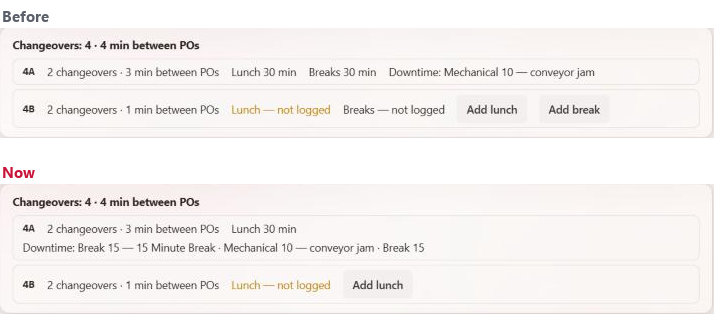
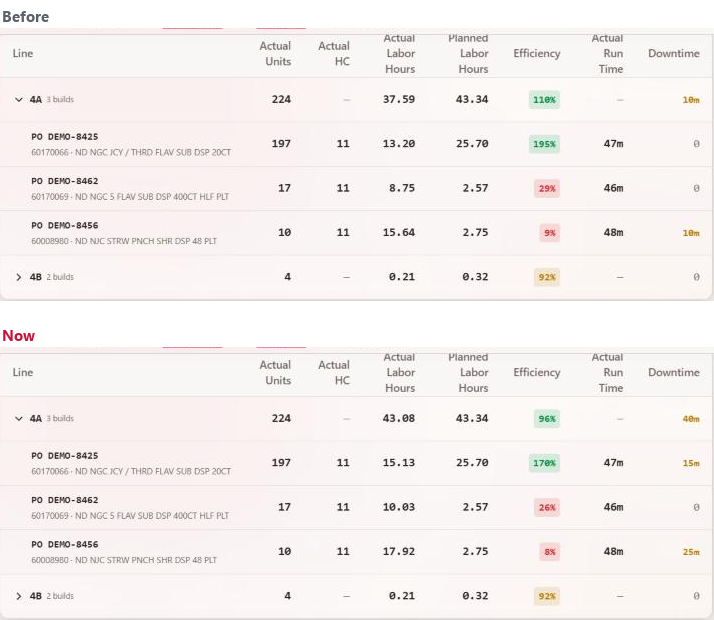
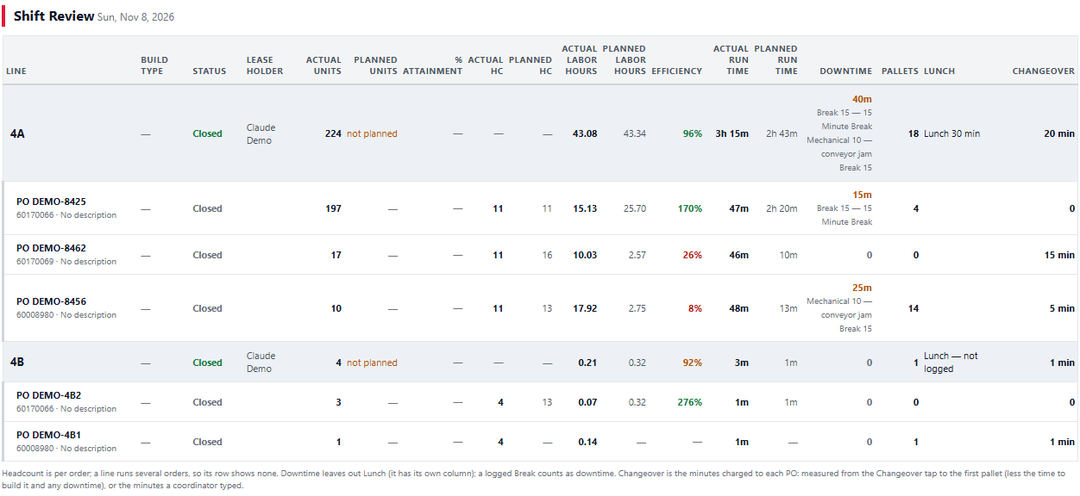
Demo line 4A, crew of 11, logged a 30-minute Lunch, two 15-minute Breaks and a 10-minute conveyor jam. Before, Downtime read 10m (only the jam), Actual Labor Hours 37.59 and Efficiency 110%. Now, Downtime reads 40m (the jam, 10, plus the two Breaks, 30), Actual Labor Hours 43.08 and Efficiency 96% (Fig. 2 and 3).
The 5.5 hours between 37.59 and 43.08 is the two Breaks: 11 people × 30 minutes = 5.5 labor hours. They used to come off the line's hours. They stay on now.
What counts where
| Logged as | Downtime column | Actual Labor Hours and Efficiency | Pay at Ferrara |
|---|---|---|---|
| Lunch | Left out (own column) | Comes off, up to 30 minutes a day | Unpaid, up to 30 minutes a day, as before |
| Break | In, with its note | Counts (stays on the clock) | Paid, as before |
| Mechanical, Material, Other | In | Counts | Paid |
Unchanged. Pay and posted hours do not move. Actual Run Time still takes both Lunch and Break off (a line at lunch or on a break was not running). Changeover minutes and rates are unchanged. At a site that marks Break as unpaid in Settings (none today), a logged Break still comes off pay and now counts against efficiency as well.
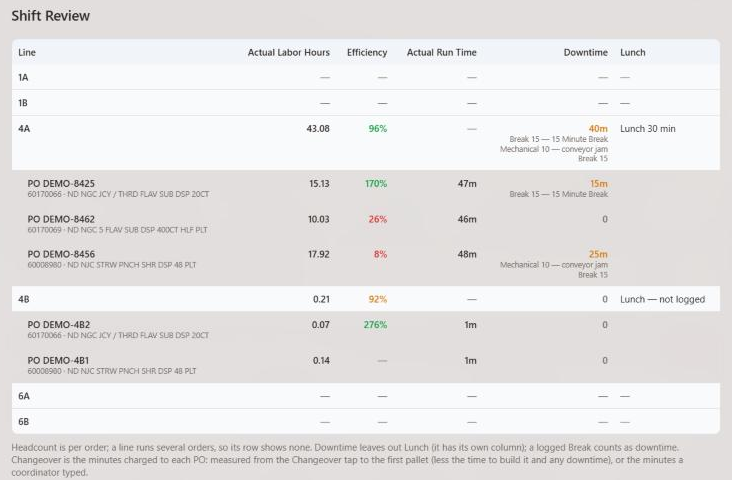
Where else it shows. History, Print and the email use the same rule (Fig. 4 and 5). Past days read with the new rule too, so a past day with a Break logged now shows more Downtime and a lower efficiency. What was posted does not change.
Changeover downtime logged before November 10 still shows in Downtime. That was the old way to log a changeover. Since v2.185.0 the CHANGEOVER button is the only way, so set-up time no longer lands in Downtime.
4. Lunch in one plain line
Each line shows its Lunch once, in the report's Lunch column (it used to be called Break/Lunch; Fig. 4 and 5). The strip above the Shift Review table on screen uses the same words. A Break has no line here: if one was logged, it is in Downtime (section 3).
| What was logged | What it says |
|---|---|
| A 30-minute Lunch | Lunch 30 min |
| A 45-minute Lunch, at a site where Lunch is unpaid | Lunch 45 min (30 unpaid). Only 30 minutes a day come off pay. |
| No Lunch logged | Lunch — not logged (amber on Shift Review, because it changes pay) |
| A Break logged | Nothing in the Lunch column. It shows in Downtime: “Break 15 — 15 Minute Break”. |
On a closed line with no Lunch, Shift Review shows an Add lunch button. There is no Add break button any more (Fig. 2).
Beacon only takes Lunch off pay when the stop was logged with the Lunch reason. A lunch logged as Other stays paid, and it shows in Downtime as a stoppage.
They are already out of the shift's hours. A Break you log counts as downtime and lowers the line's efficiency, so log one only when a break really took the line down on top of the scheduled ones.
5. Changeover minutes in the report
The report's Changeover column now shows the minutes Beacon charges as changeover. A PO row shows the changeover into that PO; the line row adds them up. The Changeover time tile at the top adds up every line.
Before, the column showed the time that passed between one PO's last minute and the next PO's Start. That is not what Beacon charged, so the report and the hours could disagree by a lot.
How the charged minutes are worked out
- The lead taps CHANGEOVER. The old PO stops and the line is in set-up.
- The changeover ends at the new PO's first pallet, less the standard time to build that pallet. Tapping Start early or late does not change it (more).
- Downtime logged during the set-up comes off.
- A PO smaller than one pallet that never tapped a pallet is measured to when it ended, if the line then moved to another PO.
- A coordinator can type the real minutes in Shift Review (Fix a missed changeover). The typed figure replaces the measured one, in the report too.
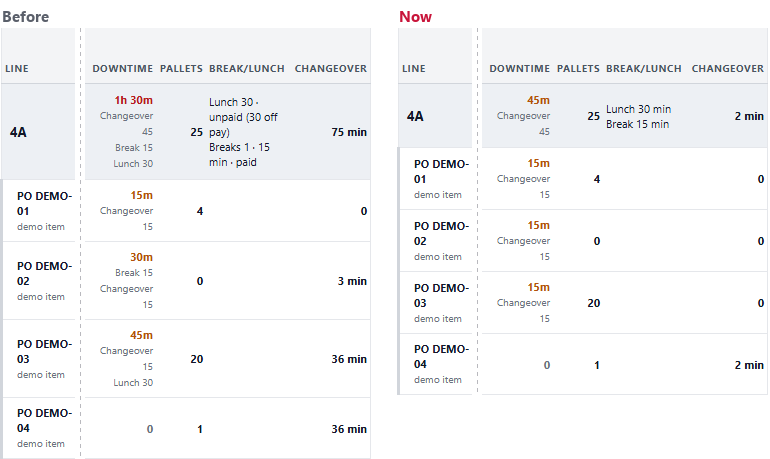
4A ran four POs that day: the four the plan had, in the same order. The old column added the gaps between them: 3 + 36 + 36 = 75 minutes. Beacon charged about 2 minutes. Two things cancelled the rest:
- The set-up was also logged as Changeover downtime. Downtime during a set-up comes off the changeover, so those minutes counted as downtime, not changeover. Since v2.185.0 Changeover is not a downtime reason, so this stops.
- On the first switch the lead tapped Start straight away and the PO never tapped a pallet, so Beacon measured 3 minutes.
The new column would have shown about 2 minutes, the same figure as the hours. A coordinator can correct a switch like this in Shift Review before submitting.
Shift Review's strip still says “min between POs”. The strip above the Shift Review table counts the time between POs, as before, and says so. The report shows the charged minutes. When the two differ, the difference is set-up time that Beacon counted as downtime or as run time.
Days before November 6, 2026 have no measured changeovers. Their reports keep the time-between-POs figure.
6. Reading a line, start to finish
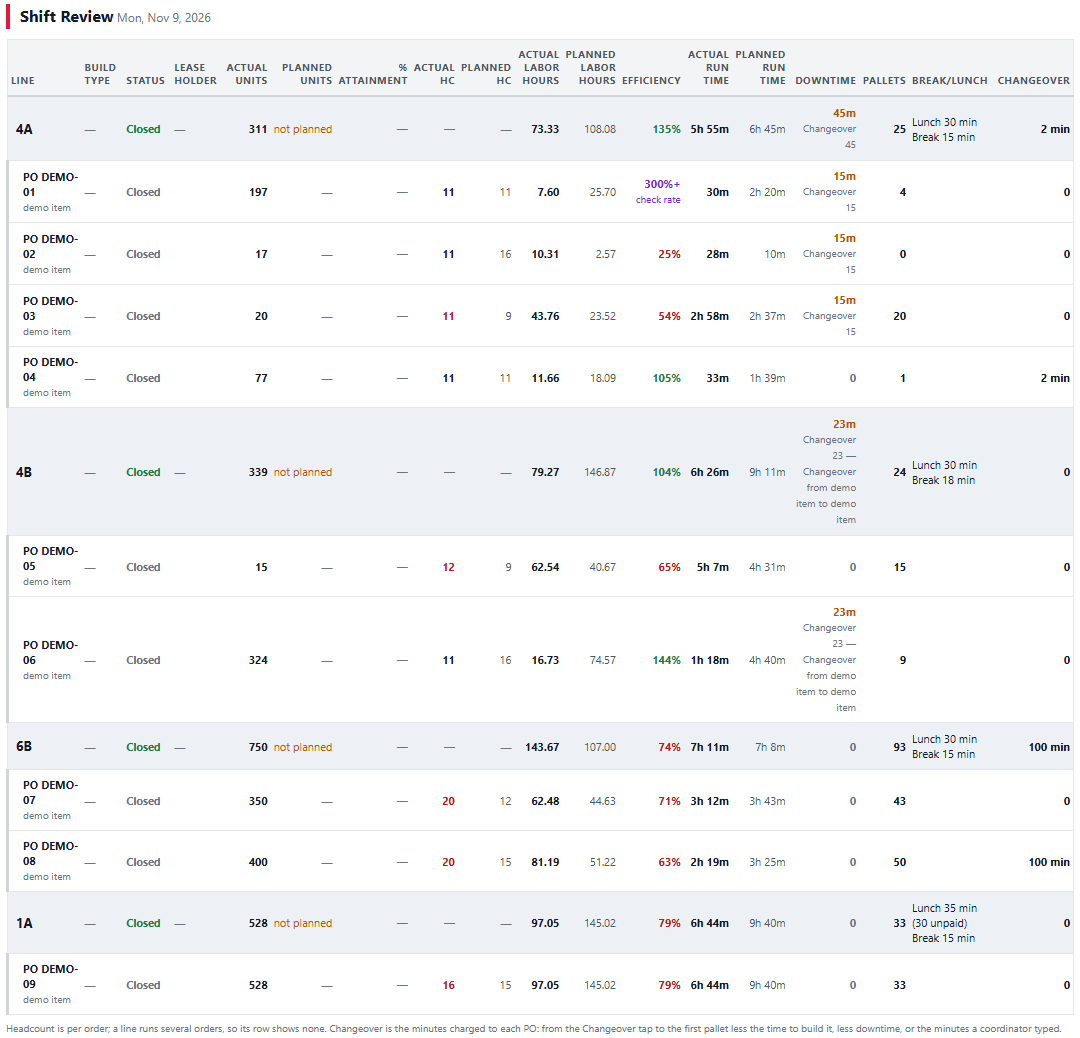
Fig. 7 is the whole Shift Review table from the November 9 report, drawn with the v2.186.0 rules (before a logged Break counted as downtime). Read a line from left to right, then check its POs underneath.
Line 6B: one long changeover
- Downtime 0 in the picture. Nothing stopped the line apart from its Lunch and a 15-minute Break. With the update that Break counts, so 6B now reads Downtime 15m.
- Lunch 30 min. Logged with the right reason, so the 30 minutes came off pay.
- Changeover 100 min, all into PO DEMO-08. The lead tapped Changeover at 10:57 and Start at 11:49, and the first pallet came at 1:10 PM. Less the time to build that pallet and the 30-minute lunch in between, that is 100 minutes, against a plan of 15.
- What to ask: was the line really setting up until 1:10, or did it build without tapping pallets? The 12:00 hour shows no units. If set-up really ended earlier, a coordinator types the real minutes under Add changeover.
Line 1A: one PO all day
- Changeover 0. One PO, so nothing to change over.
- Lunch 35 min (30 unpaid). 35 minutes were logged; only 30 a day come off pay.
- Downtime 0 in the picture. The line never stopped for anything but Lunch and a 15-minute Break, which now counts (Downtime 15m).
Line 4B: changeover logged as downtime
- Downtime 23m, “Changeover 23 — Changeover from … to …”. The lead logged the set-up as downtime. That cancelled the measured changeover, so Changeover reads 0. From November 10 the tablet no longer offers Changeover as a downtime reason.
7. Before you submit
The report is built from Shift Review when you submit. Check these first. Each takes a minute and changes what the report says:
- Lunch on every line. A line reading “Lunch — not logged” in amber posts its lunch as paid. Add it in the line's Close & adjust, with the Lunch reason.
- Downtime reasons. Everything in Downtime should be a stoppage or a Break that really was logged. A lunch logged as Other shows as a stoppage. Fix the reason in Close & adjust.
- No Break to add. The two scheduled breaks are already out of the shift, so do not log them. A Break that is logged counts as downtime.
- Changeovers that look wrong. A changeover far over plan is flagged under Check before you submit. One of 0 to 3 minutes usually means the lead tapped Start at once. Type the real minutes under Add changeover (how).
- Shift Hours filled in. The report's headcount is worked out from it.
8. Questions
Why did Downtime change on past days in History?
History reads every day with the current rule. Lunch leaves the Downtime column, and a Break that was logged counts in it, so a past day with a Break logged now shows more Downtime and a lower Efficiency. Nothing that was posted changed: hours, pay and rates are the same.
Does this change anyone's pay or the posted hours?
No. Lunch still comes off pay the same way, a Break is still paid unless the site marks it unpaid, and run time and rates still take Lunch and Break off. What moves is the Shift Review: Downtime, Actual Labor Hours and Efficiency now count a logged Break. At Ferrara, where Breaks are paid, a line's Actual Labor Hours now equal the hours posted for it.
A Break was logged and the line's efficiency dropped. Is that right?
Yes. A logged Break is time the line was stopped, so it stays on the clock. A 15-minute Break with a crew of 11 adds 11 × 15 minutes = 2.75 labor hours to the line. If it was one of the two scheduled breaks, it should not have been logged: they are already out of the shift's hours.
Where did the Add break button go?
It is gone, together with the “Breaks — not logged” line. A missing Break is not a mistake to fix, because the scheduled breaks are already out of the hours. Add lunch is still there, because a missing Lunch changes pay.
The strip says 36 minutes between POs and the report says 2. Which is right?
Both, about different things. 36 minutes passed between the two POs. Beacon charged 2 of them as changeover; the rest counted as downtime or as run time. If the set-up really took 36 minutes, a coordinator can type 36 under Add changeover before submitting.
Can we get Production Units or Line Performance back?
Yes. An Admin ticks it in Settings (section 2). The next report shows it.
Is the email the same as the screen?
Yes. The email, Print and the History screen follow the same list of sections and show the same numbers.