Beacon how-to · November 2026
Changeovers, a fairer Efficiency, and Shift Review in the Daily Synopsis
Shift Review now shows each line's changeovers. Efficiency now counts the units you built, not just the hours. And the whole Shift Review table now comes with the Daily Synopsis: on screen, in Print and in the email.
- v2.176.0
1. What's new
- Changeovers on Shift Review. A strip above the table, one row per line. Read it
- Efficiency counts what was built. A line that built less than planned now shows it. How it works
- No more 0.00 hours on a PO row when the crew was typed on the roster at close. Details
- The Shift Review table is in the Daily Synopsis, in Print and in every synopsis email. Where to find it
- Two new tiles: Changeovers and Changeover time. On Checkpoint days, CPLH is called “Units per assembly hour”. Tiles
- Margin % in the billing columns. Margin %
- Admins choose what the Daily Synopsis shows for their site. How
Screenshots are from Beacon's dev site. The POs named DEMO-… and all their numbers are demo data, not real production. The release number is set when it ships.
2. Changeovers on Shift Review
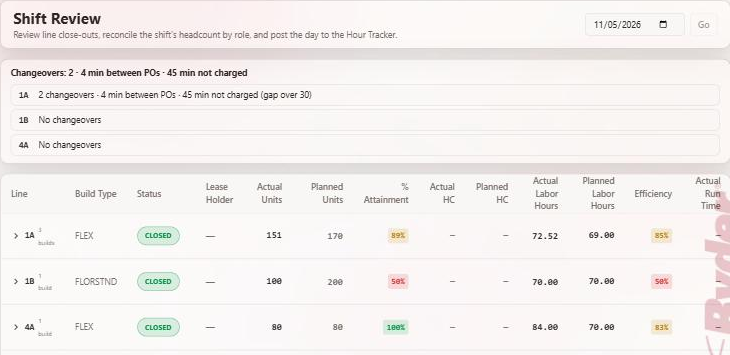
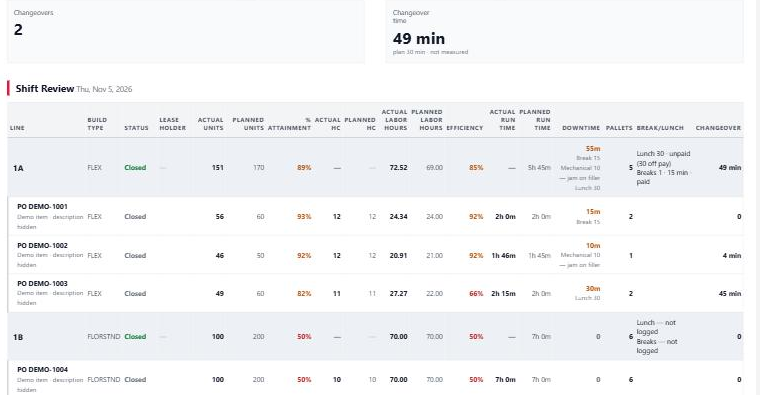
Shift Review has a new strip above the table. It has one row per line. Each row says how many changeovers the line had and how many minutes sat between its POs. The header at the top adds up the whole shift.
What is charged and what is not
- 30 minutes or less between two POs is charged to the POs. The 4 minutes on 1A are charged.
- More than 30 minutes is taken off the posted hours as idle time. The strip calls it “not charged”. The 45 minutes on 1A are not charged.
Why it says “not measured”
For now, the minutes are only the gap between the end of one run and the start of the next. That is why Beacon marks them “not measured”. Set-up done after the new PO's run has started is not in them. Real changeover timing comes in a later update.
3. Efficiency now counts what was built
Efficiency now compares the units built per labor hour with the plan's units per labor hour.
Before, it only compared planned labor hours with actual labor hours. It never looked at units. So a line that built half its plan in the planned time read 100%.
What moves it, and what doesn't
- Built exactly the plan: the same number as before.
- More people, or took longer: still pushes it down.
- Built less than planned: now pushes it down too.
- A line with several POs: each PO counts by its planned hours. A PO planned for 30 hours counts three times as much as one planned for 10.
- Starting counts (what you enter with Built before connecting) don't count toward Efficiency. Example: a line connects with 20 already built and builds 40 more. Efficiency uses the 40.
Older days
Shift Review works Efficiency out again each time you open a day. So an older day shows the new number too. Emails that were already sent keep the old number.
4. No more 0.00 hours on a PO row
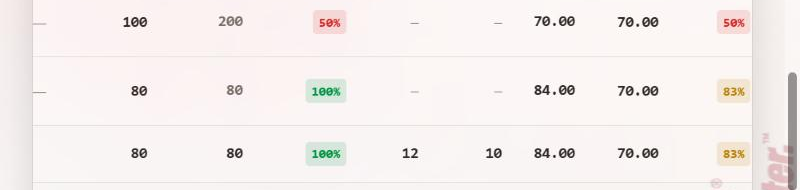
Sometimes the crew is typed on the roster when the line is closed, and no run had a crew of its own. Before, the PO rows on that line showed 0.00 labor hours and Efficiency “—”.
Now those PO rows use the line's crew, the same crew the bill uses.
New in v2.195.0Actual HC shows the typed crew too
The hours already used the typed crew, but Actual HC on the PO row still showed “—”. That read as “nobody worked this line”, even with real hours right beside it.
Now Actual HC shows the number of people its hours were worked out from:
- Crew entered on the tablet when the PO started: that crew, same as before.
- Crew typed in Close & adjust: the typed crew, even if a crew was also entered on the tablet, because the hours and posting use the typed one. Hover the number and it says “Typed at close-out in Close & adjust. The hours and posting use this roster.”
- No crew anywhere: still “—”.
The Daily Synopsis and its email show the same number. When any PO in the table has a typed crew, the note under the table adds: “Where a crew was typed at close-out in Close & adjust, Actual HC shows that crew, and the hours use it.” In the email, an Actual HC above Planned HC is still red.
5. The Shift Review table is now in the Daily Synopsis
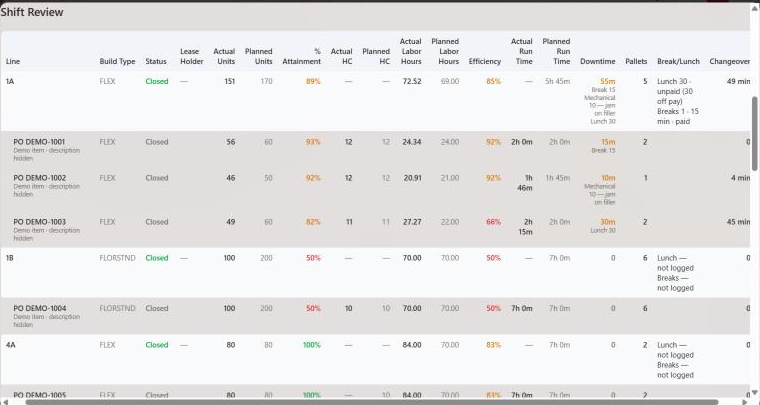
The table you see in Shift Review now also shows in:
- History → Synopsis → Daily Synopsis
- Every synopsis email
It shows only on days with Checkpoint lines. A day with no Checkpoint lines has no Shift Review table.
What is in it
- Every Shift Review column, from Line to Downtime: units, % attainment, headcount, labor hours, Efficiency, run time and downtime.
- Pallets.
- Break/Lunch, for example “Lunch 30 · unpaid (30 off pay)”, “Breaks 1 · 15 min · paid” or “Lunch — not logged”.
- Changeover: the changeover minutes going into each PO.
Two more things to know:
- The Downtime cell shows the note typed with the downtime, for example “Mechanical 10 — jam on filler”.
- Actual HC is red when it is above Planned HC. Example: Planned HC 12 and Actual HC 14 shows the 14 in red.
6. New synopsis tiles and labels
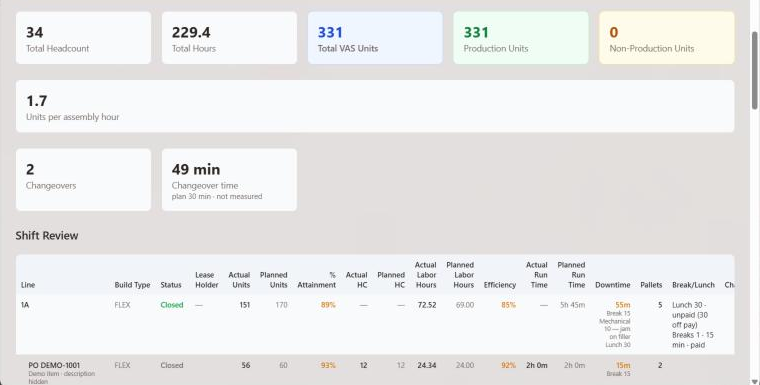
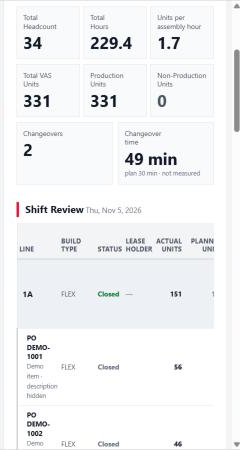
On days with Checkpoint lines, the Daily Synopsis has two new tiles:
- Changeovers: how many changeovers the day had.
- Changeover time: the minutes, with the plan under it. It says “not measured” for now (why).
On those days the CPLH card is called “Units per assembly hour”. It is the same number with a plainer name. It divides by assembly hours (the Assembly column of the Labor by role table), not by Total Hours. In Fig. 3: 331 units ÷ 195.4 assembly hours = 1.7. Dividing by Total Hours (229.4) would give 1.44, which is not this number.
The email
When the email carries the Shift Review table, it gets wider (1220 px) so every column fits in a full-screen Outlook window. On a phone, the table scrolls sideways. Days without the table look exactly as before.
7. Margin %
The billing columns now have Margin %: the margin divided by what was billed. The margin total shows its Margin % too. If nothing was billed, it shows “—”.
8. Choose what the Daily Synopsis shows (Admins)
- Go to Settings → Email Settings.
- Find the card Daily Synopsis — what to show.
- Untick a piece you don't want.
- Click Save Daily Synopsis.
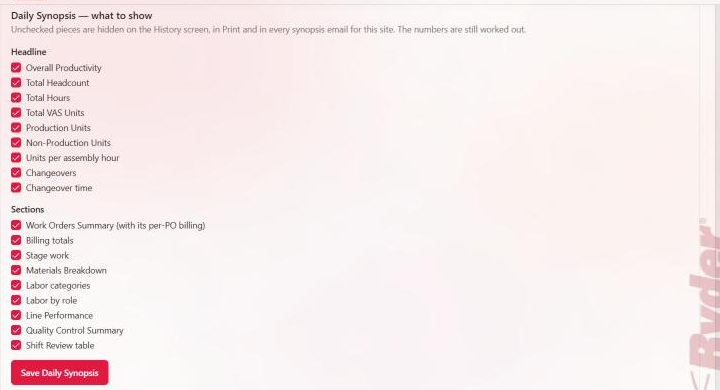
- It applies to the whole site: the History screen, Print and every synopsis email.
- A hidden piece is still worked out. It is just not shown.
- You can't hide everything.
- Leads and below can see the card but can't change it.
- The Weekly Synopsis doesn't follow these settings yet.
9. Questions
Why did Efficiency drop on my line?
Most likely the line built less than planned. Efficiency now counts units, not just hours. Example: line 1B in Fig. 1 built 100 of 200 in its planned hours. It used to read 100%. It now reads 50%.
What does “not measured” mean?
The changeover minutes are only the gap between one run ending and the next starting. Beacon does not time the set-up yet. Set-up done after the new PO's run starts is not in the minutes. Real changeover timing comes in a later update.
Why does Line Performance still say “Unknown” at Ferrara?
Posted hours don't carry the line yet. This release doesn't change that.