Beacon how-to · next release · November 2026
Synopsis and History: the numbers now agree
Three fixes from the November QA sweep. The Daily Synopsis tells you when a day is not posted yet. Monthly and Year to Date work out CPLH the same way the Daily does. History shows an order on every day it was worked, with that day's units.
- Next release
1. What's new
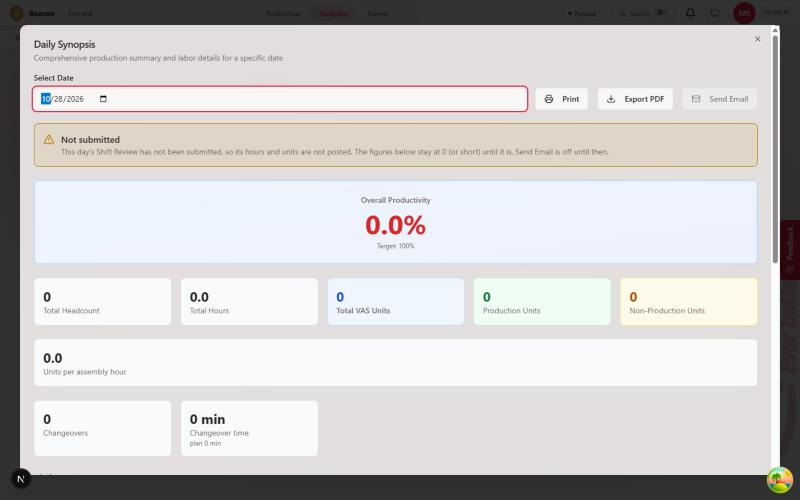
- Not submitted. A Daily Synopsis for a day whose Shift Review is not submitted says so, and Send Email stays off until it is. See it
- One CPLH. Monthly, Quarterly and Year to Date CPLH now divide by the same hours as the Daily: assembly hours, less changeover and start-up. Each Monthly day row now matches that day's Daily. Example
- Multi-day orders in History. An order shows for every day it has hours on. Its units, hours and CPLH are the days you picked, not the whole order over one day's hours. Example
Screenshots are from Beacon's dev site. Orders named DEMO-… and "Demo item" are demo data with their names changed; the numbers are the dev site's own.
2. Daily Synopsis: Not submitted
On a Checkpoint site, a day's hours and units reach the synopsis when its Shift Review is submitted. Before that, every number reads 0. The synopsis now tells you instead of showing zeros with no reason.
- Go to History → Synopsis → Daily Synopsis and pick a date.
- If the day's Shift Review is not submitted, you see Not submitted at the top and Send Email is greyed out (Fig. 1).
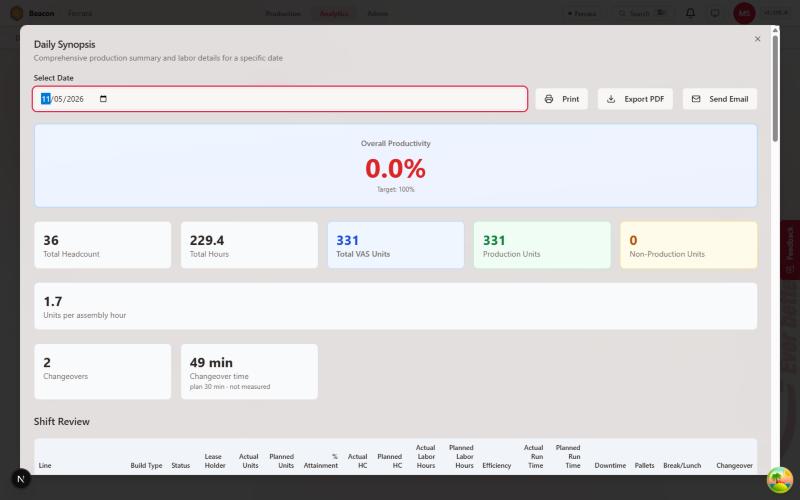
- Submit the day in Shift Review, then open the Daily Synopsis again. The banner is gone and Send Email works (Fig. 2).
| What the day is | What you see |
|---|---|
| Shift Review submitted | No banner Send Email on. |
| Shift Review reopened for corrections | Reopened The figures can still change. Send Email on. |
| Checkpoint sessions, Shift Review not submitted | Not submitted Send Email off. |
| Hours entered by hand (Hour Tracker, no Checkpoint) | No banner Send Email on. |
| Nothing posted at all | Nothing posted Send Email off. |
3. Monthly and Year to Date CPLH
The Daily Synopsis divides units by assembly hours (less changeover and start-up). The Monthly day rows used to divide by all of the day's hours, and Year to Date used all hours too. So the same day showed two CPLHs.
3,708 units. All hours 394.52, assembly hours 371.76.
Before: Monthly row 3,708 ÷ 394.52 = 9.40, Daily 3,708 ÷ 371.76 = 9.97.
Now: both read 9.97.
How each number is worked out now:
- A Monthly day row = that day's Daily CPLH.
- The month = all the month's units ÷ all its days' assembly hours. Not an average of the days.
- A quarter and the year = the same, added over their months.
- Year to Date average headcount = the average of the days worked. A 3-day month no longer counts as much as a 22-day month.
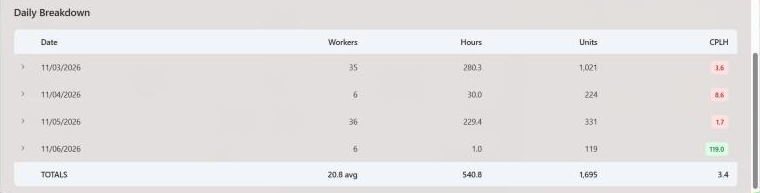
Hours, units, cost and headcount per day do not change. Only CPLH and the year's average headcount move.
4. History: orders that ran more than one day
History used to pick an order by the last day someone saved its hours, show its close date, and divide the whole order's units by only the hours inside your dates. A two-day order picked for its first day could read a CPLH in the thousands, and on its second day not show at all.
Now an order shows on every day it has hours. For the dates you pick, the card shows:
- Units: units built on those days. When that is part of the order it reads 77 of 154.
- CPLH: those units ÷ those days' hours (case-build hours, less changeover and start-up, as before).
- Worked: the days it was worked inside your dates. The close date is in Details and the CSV.
Day 1 only: before 154 ÷ 0.05 = 3,080. Now 77 ÷ 0.05 = 1,540, units "77 of 154" (Fig. 4).
Day 2 only: before, not listed. Now listed, 77 ÷ 0.42 = 183.3 (Fig. 5).
Both days: 154 ÷ 0.47 = 327.7, the same as it always was (Fig. 6).
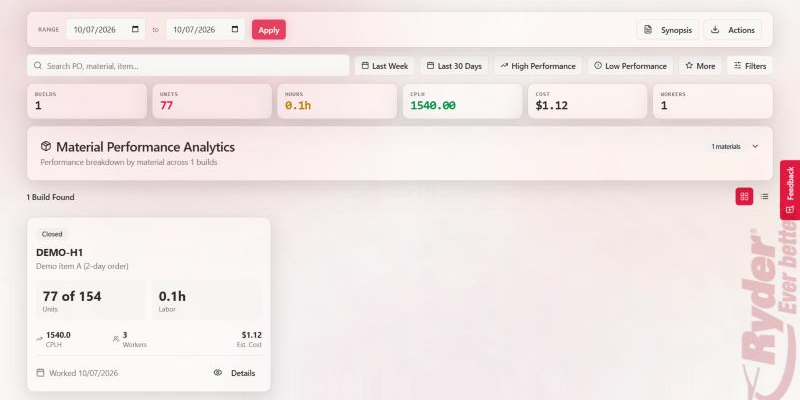
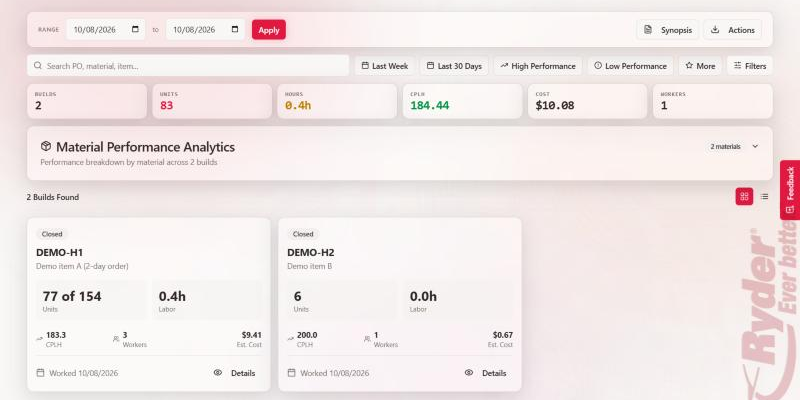
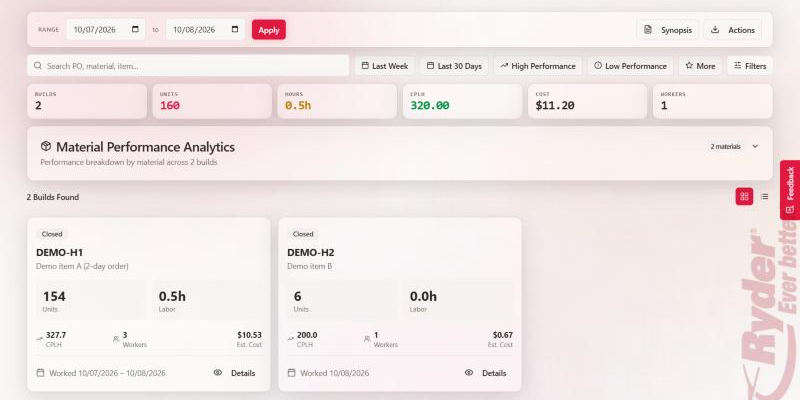
The totals across the top, Material Performance Analytics, the table view and the CSV all use the same in-range units and hours. The CSV gains Worked and Order Units columns.
5. Questions
Our monthly CPLH went up. Did we get faster?
No. The same work is now divided by assembly hours, as the Daily always was. Leads, material handlers and QA hours are still in the month's hours and cost; they are just not in the CPLH, the same as on the Daily.
Does adding up four Weekly Synopses give the Monthly?
The CPLH now uses the same rule. Small differences can remain where a month counts earlier-stage (inner-pack) records that the Daily keeps apart.
Why does the Daily Synopsis say Not submitted when I can see the Shift Review rows?
The rows come live from the floor tablets. The hours and units count once the Shift Review is submitted. Submit it and reopen the synopsis.
A History card says "77 of 154". Where are the other 77?
They were built on a day outside the dates you picked. Widen the dates to see the whole order.