Beacon how-to · November 2026
One sign-in for every Beacon tab
If you keep several Beacon tabs open, they now share one sign-in. Opening or reloading one tab no longer knocks the others out for a moment, which is what made Build Schedule say “Failed to load build schedules” with the menu still on screen. And when a page can't load, the card now says why and gives you the button that fixes it.
- v2.196.0
Screenshots are from Beacon's test site. The version number is set when this ships.
1. Patch notes
v2.196.0 Nov 2026
- Tabs share one sign-in. Opening or reloading one Beacon tab no longer signs your other tabs out for a moment. More
- Sign out once, signed out everywhere. Signing out in one tab sends every Beacon tab in that browser to the sign-in page. Signing back in brings the other tabs back too.
- A clearer error card on Build Schedule. It shows the error code and offers Try again or Reload, whichever can fix it. More
- Less work on each page load. Each tab records your sign-in time once per page load instead of four times.
2. One sign-in for every tab
Where: every Beacon page. Who: anyone with more than one Beacon tab open.
BeforeOne tab's page load could knock out the others
Every page load moved the saved sign-in from one place in the browser to another and back, about a second later. The other Beacon tabs were watching the wrong place, so for that second they had no sign-in. Beacon runs all its tabs' data through one of them. When that tab was the one without a sign-in, every tab's data was refused, while the menu and the page around it still showed you as signed in.
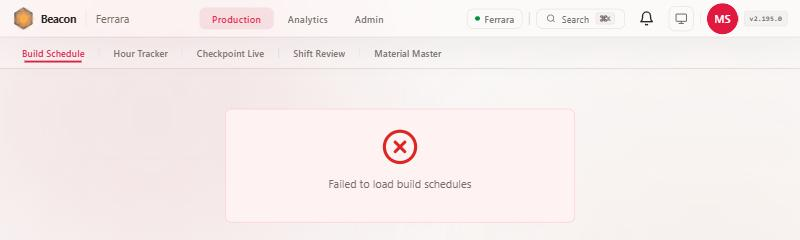
On the test site, with two other Beacon tabs open, 20 reloads of Build Schedule sent the tab back to the sign-in page 4 times, and each of the other two tabs lost its sign-in for a moment 3 or 4 times.
NowEvery tab uses the same sign-in, and notices when it ends
- A page load no longer moves your saved sign-in, so the other tabs never lose it. The same test, 20 reloads plus 5 loads back to back: no error card, no trip to the sign-in page, and the other tabs kept their sign-in the whole time.
- When you sign out in one tab, every Beacon tab goes to the sign-in page. When you sign in again, the other tabs come back too.
- Beacon now finishes its security check before it checks your saved sign-in, so that sign-in is no longer thrown away while a page starts.
3. If Build Schedule can't load
The card now says what went wrong, with the code in brackets, and gives the button that can fix it. It should be rare now. If you see one, here is what to do.
Try again“Beacon couldn't confirm access”
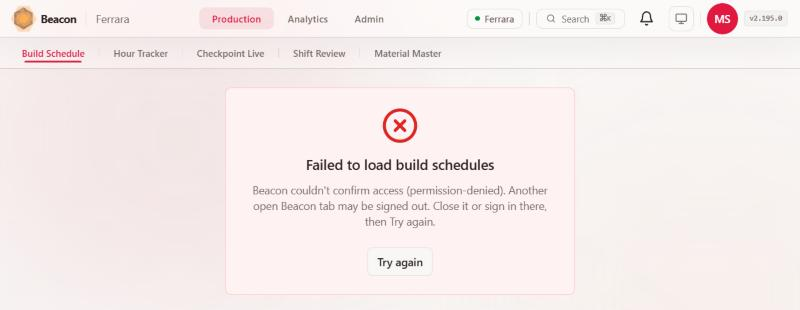
- Look at your other Beacon tabs. Close any that show the sign-in page, or sign in there.
- Come back and click Try again.
- Still there? Reload the page. If it keeps coming back, send John the words in brackets.
Reload“This tab is no longer signed in”
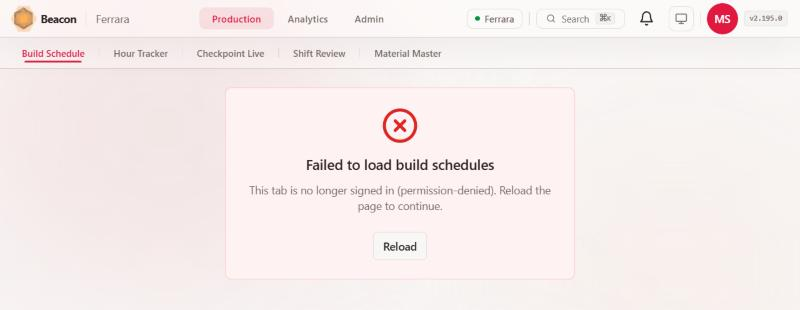
- Click Reload. The page loads again with your saved sign-in.
- If your sign-in has ended, you land on the sign-in page. Sign in and you are back in Beacon.
OtherAny other code
The card says Beacon couldn't load this page
with the code, for example unavailable when the connection dropped. Check the network, then click Try again.
4. Questions
Do I have to sign in again after this update?
No. Your saved sign-in carries over. A tab that was open during the update keeps the old version until it reloads, so reload it when the new version
banner asks.
Is Beacon slower to open?
On the test site, no: about 0.9 seconds to sign in and 1.3 seconds to show the orders (1.1 and 1.4 seconds before). The live site also runs its security check first now, which can add a moment to the first page after a long break.
Does this change the TV boards?
No. A board opened from its board link keeps its own sign-in, as before.
What went wrong on Nov 19?
Build Schedule said Failed to load build schedules
with the menu still up, and a reload fixed it. Beacon's data was fine. The read was refused because, at that moment, the tab running Beacon's data had no sign-in, for the reasons in section 2.