Beacon how-to · November 2026
Save changes to a saved quote
Open a saved quote in the calculator, change it, and save it back over the same quote. You no longer get a second row for the same SKU each time. The quote keeps a note of its old price.
- v2.200.0
Screenshots are from Beacon's test site. “DEMO Variety Box quote” is demo data.
1. Patch notes
- Save changes to this quote. After Open in calculator, the save button replaces the quote you opened instead of adding a new row. How
- Save as new quote is still there when you want to keep the old one. When to use it
- The old price is kept. The saved-quotes list shows “updated” and what it was before. See it
2. Save changes to a quote
- Go to Material Master → Costing (or a SKU's page) and find the quote under Saved quotes.
- Click Open in calculator. The quote's name shows at the top in a Saved quote box.
- Make your changes, for example the quantity, steps or markup, and click Calculate. The box says edited since saved.
- Click Save changes to this quote. You'll see Quote updated.

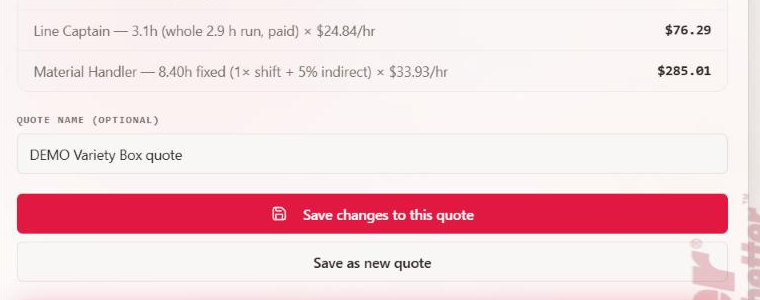
You can also change the name before you save. The new name replaces the old one.
Anyone who can save quotes can save changes to one.
3. The old price stays on the quote
After a save, the quote stays in the same place in the list, with its new numbers. The grey line adds updated with the date, and was with the price before your change.
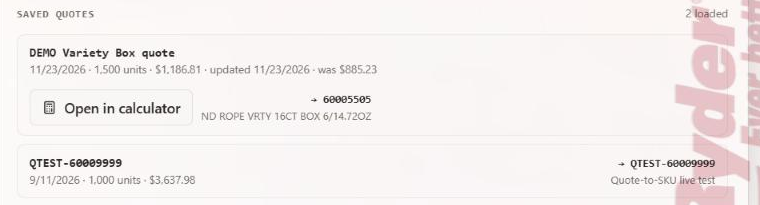
Example: the quote was saved at 1,000 units for $885.23. You opened it, changed it to 1,500 units and saved changes. The row now reads 1,500 units · $1,186.81 · updated 11/23/2026 · was $885.23.
Beacon keeps every earlier price on the quote, with who saved it and when. The list shows the last one.
4. When you get a new quote instead
- You click Save as new quote. The quote you opened stays as it was, and a new row is added.
- You pick a different SKU, group or mode after opening the quote. That is a different quote, so the Saved quote box goes away and the button goes back to Save to Archive, which adds a new row.
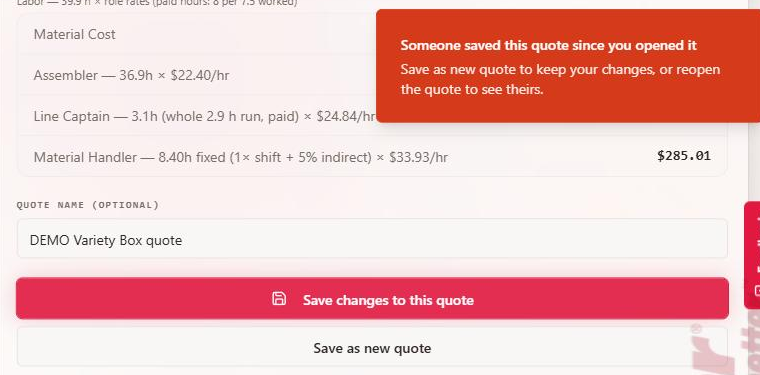
- Someone else saved the same quote after you opened it. Beacon won't overwrite their change. You'll see the message below, and your changes stay on screen. Click Save as new quote to keep yours, or open the quote again to see theirs.
5. Questions
What about the extra rows we already saved?
They stay. A Coordinator or above can delete the ones you don't need.
Does saving changes move the quote to another SKU?
No. A quote stays on the same SKU's list. If it was built on a stand-in (proxy) SKU and attached to the real one, it stays attached.
Why can't I see Open in calculator on an old quote?
Quotes saved before late September 2026 didn't keep what the calculator needs to reopen them, so they can't be opened or saved over.
Why is the price different when I open a quote?
An opened quote is priced with today's standards. The Saved quote box shows the saved price next to today's. When you save changes, today's price becomes the quote's price, and the old one is kept as was.