Beacon how-to · October 2026
What's new: Oct 16, 2026
Start any order that isn't finished, see every open order in Changeover, and count the whole week's built units.
- v2.156.1
- v2.157.0
- v2.157.1
- v2.157.2
1. Patch notes v2.156.1 – v2.157.2 Oct 16, 2026
- v2.157.2
- Server upkeep: Beacon's server functions now run on Node.js 22, ahead of Google retiring Node.js 20 on October 30. Nothing changes on screen.
- Sign-in: unused sign-in lockout code that never ran has been removed. Signing in works exactly as before.
- v2.157.1
- Started orders sit at the time they started: when Start Line or Changeover starts an unfinished order from an earlier day or another line, the planner places it at the time it started instead of after the line's last order. The line's later orders for today move back behind it so nothing overlaps.
- Change record: the planner's record of the move names the line the order came from (for example "Moved from line 6A").
- No more flicker: the Checkpoint console no longer flashes "Not connected" for a moment every 30 seconds, which closed the crew question or any open panel mid-entry.
- SAAG board schedule: "Today's Schedule" draws each order at its planned time. Before, every order was drawn several hours early, bunched at the left edge.
- v2.157.0
- Start any unfinished order: Start Line and Changeover no longer offer orders that are already built, and they now offer this line's unfinished orders from earlier in the week.
- Changeover also lists other lines' open orders for the week. Starting one moves it onto today's plan for this line.
- Finished means the order is closed, or its built units reach the order quantity — including units from days whose Shift Review has not been submitted yet.
- Whole order on the console and SAAG board now also counts units built earlier this week on every line, before that day's Shift Review is submitted.
- v2.156.1
- Site time zone on the server: the synopsis and test emails, the labour analyzer and the production scheduler use the site's time zone for “today” instead of the server's clock (UTC), which treated the evening as already being tomorrow.
2. Start any order that isn't finished
Start Line used to offer only what was planned for today on that line. Now it offers what is planned today, minus orders that are already built, and — if nothing is left for today — this line's unfinished orders from earlier in the week. Starting one moves it onto today's plan for this line.
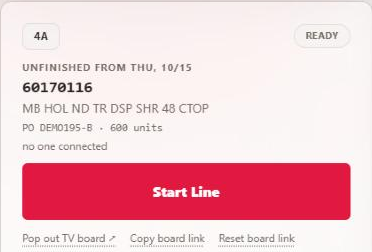
PO numbers shown are demo data.
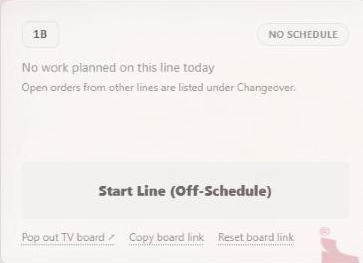
3. Changeover shows every open order
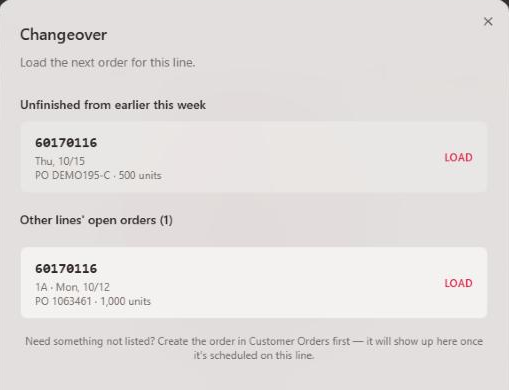
Changeover now has up to three lists:
- Today on this line — as before, without orders that are already built.
- Unfinished from earlier this week — this line's orders from earlier days that aren't finished.
- Other lines' open orders — tap to open. Orders planned on other lines this week that aren't finished and aren't running on another line right now.
Picking one from the second or third list moves it onto today's plan for this line, then loads it as usual (the crew question still comes first).
4. What “finished” means
An order counts as finished when it is closed, or when its built units reach the order quantity. Built units include what the lines counted on days whose Shift Review has not been submitted yet, so this works even when a day was not posted.
5. Whole order counts the whole week
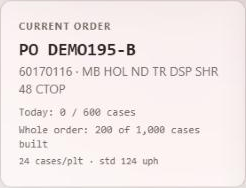
“Whole order” on the console and the SAAG board now adds the units every line built on this order earlier in the week, before those days' Shift Reviews are submitted.
6. A started order sits at the time it started
When a lead starts an unfinished order from an earlier day or another line, Beacon moves it onto today's plan for the line. It now goes in at the time it was started, and this line's later orders for today move back behind it, in the same order, with the usual changeover gap between different orders. Orders that are finished, and orders the planner can't time, are left where they are.
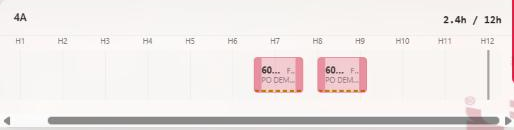
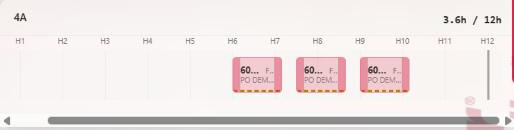
H6 means six hours after the day starts. PO numbers are demo data.
7. The SAAG board's schedule strip is fixed
The "Today's Schedule" strip at the bottom of the SAAG board drew every order several hours too early, so orders bunched against the left edge. Each order now sits at its planned time, lined up with the NOW marker.


Submitting Shift Review posts each day's quantities to the order, offers Close finished orders? so finished orders come off the plan, and keeps the daily and monthly reports right. Beacon now copes with a missed day, but the reports still need it.