Beacon how-to · October 2026
What's new: Oct 15, 2026
The SAAG board's new order-first layout, Today and Whole order progress, and site time zones.
- v2.155.1
- v2.156.0
1. Patch notes v2.155.1 – v2.156.0 Oct 15, 2026
- v2.156.0
- Site time zones: each site has a time zone. Checkpoint, the SAAG board and the planner's “today” use it instead of the screen's own clock, so a TV set to the wrong zone no longer shows the wrong time or wrong rates.
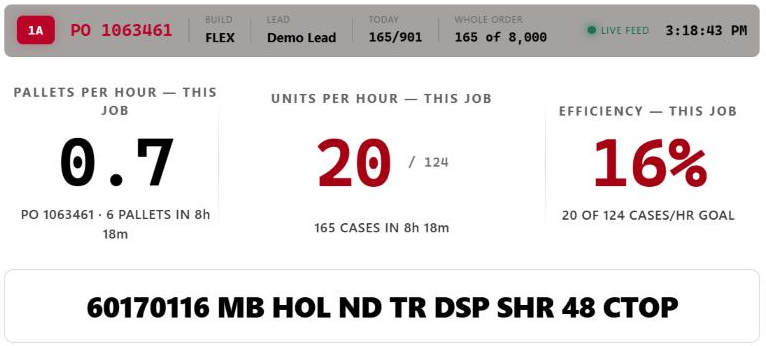
- SAAG board: the PO is in the top bar; the item number and description are in the big centre band.
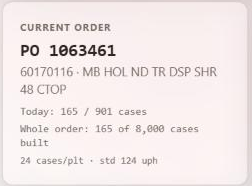
- Board and console: “Today” shows today's progress on the order (for example 165 / 901); “Whole order” shows how much of the entire PO is built (for example 165 of 8,000).
- v2.155.1
- Reports: daily, monthly and yearly productivity (synopsis, KPI rankings, labour analytics) is worked out from the units built during the session. Units entered as built before connecting still count in every total, but no longer inflate productivity.
- Shift Review: a starting count on one line no longer holds back an order another line has real hours on. An order whose only units were entered at the start is listed with a note to add it in the Hour Tracker.
2. The SAAG board's new layout
The board now leads with the order. The top bar shows the line, PO, build, lead, Today and Whole order. The big centre band shows the item number and description.
- Today = units built on this order today / today's planned quantity.
- Whole order = units built on the entire PO so far / the PO's total order quantity (built includes today's units once they are counted on the line).

3. The console shows the same
The console's Current Order tile shows today's progress and the whole PO total.
4. For admins: set each site's time zone
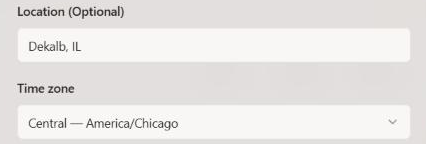
Screens follow the site's time zone, not their own clock. If a site has no time zone set, screens keep using their own clock (the old behaviour).
- Go to Admin → Tenant Management.
- Open the site's menu (⋯) → Edit.
- Choose the Time zone (Eastern, Central, Mountain, Arizona or Pacific) → Save.
- Boards and tablets pick it up on their next load; TV boards reload themselves after an update.
Why this matters
A board on a TV whose clock was set to UTC showed 12:28 at 7:28 AM and divided every rate by the wrong running time. With the site's time zone set, it shows 7:28 and the real rates.
Ferrara is set to Central and Buckner to Eastern.