Beacon how-to · November 2026
Morning start-up: paid time Beacon adds for you
Every morning the floor spends a few minutes getting ready before anyone builds. Nobody logs it. Now Beacon adds it for you: the start-up window (Ferrara: 7:00–7:15, Monday to Friday) goes on each line's first PO as paid start-up time. It counts in hours and cost, never in rates.
- v2.177.0
1. What's new
- One setting per site. Pick the start time, how many minutes, the latest start and the days. See it
- Leads do nothing new. Beacon works out each line's start-up when the line is closed. Examples
- Paid, not graded. Start-up is in posted hours, labor and cost. It is left out of efficiency, units per labor hour and productivity. Why
- Shift Review tells you when a line started too late for start-up, or was closed without it. Example
Screenshots are from Beacon's dev site. The POs named DEMO-SU-… and all their numbers are demo data, not real production.
2. Turn it on
- Go to Admin → Settings → Labor Rates and open Advanced.
- In the Morning start-up card, switch it on (Fig. 1).
- Set Start time, Minutes, Latest start and the Days, then Save changes.
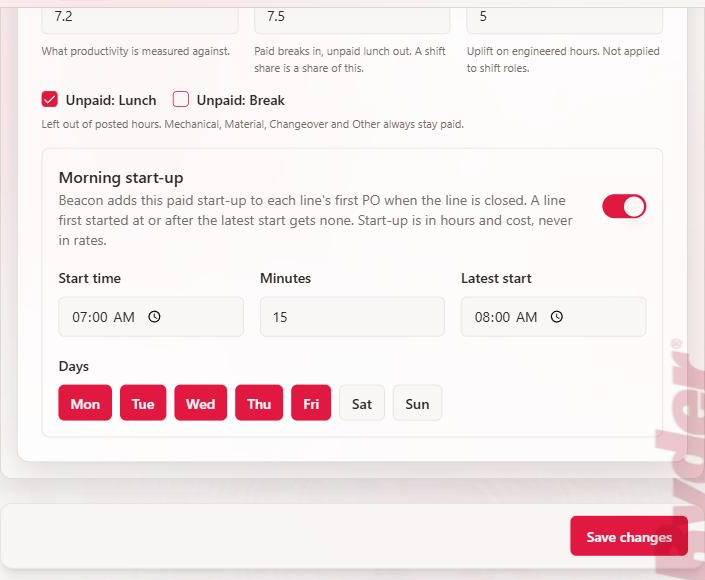
Latest start is the cut-off. A line whose first PO starts at or after it gets no start-up that day: those people were not there for the morning start-up. It must be at or after the end of the start-up (7:15), or Beacon will not save.
3. What each line gets
Every line whose first PO starts before the latest start gets the whole start-up window. Some of it may fall inside the line's own time (the line was already logging), and the rest before it.
| What the line did (start-up 7:00–7:15, latest start 8:00) | Start-up it gets |
|---|---|
| Started at 7:04 | 15 min 4 min before the line started, 11 min inside it |
| Started at 7:15 | 15 min all before the line started |
| Started at 7:41 | 15 min all before the line started |
| First note at 6:58, first PO at 7:30 | 15 min all inside the line's time. The wait for the first PO is not cut out. |
| Started at 8:20 (after the latest start) | None Shift Review says why (section 5) |
| Never ran | None nothing is posted for a line with no PO |
Start-up goes on the line's first PO, at the crew that PO started with. If the line ran two sessions, only the morning one gets it.
4. Closing a line
When a line is closed (by the lead, by the coordinator with Close & adjust here, or by the automatic close-out), the close sheet says what start-up it got (Fig. 2). Nothing to type.
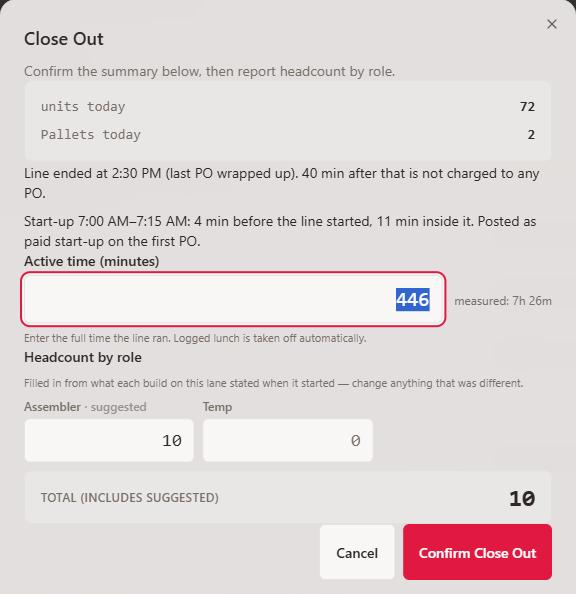
Start-up is worked out from the setting as it is when the line closes and saved with the close. Changing the setting later does not change lines already closed. To recount one, reopen it and close it again.
5. Check before you submit
Two new notes can show in Shift Review. Neither stops Submit.
- “… was closed without its start-up.” The line closed before the setting was on, or while Beacon could not read it. Tap Reopen & close: Beacon reopens the line and closes it again with its start-up. Counts are kept.
- “… started 8:20 AM, after 8:00 AM, so no start-up was counted.” Just so you know. If the crew really was in at 7:00, the first PO's start time is wrong.
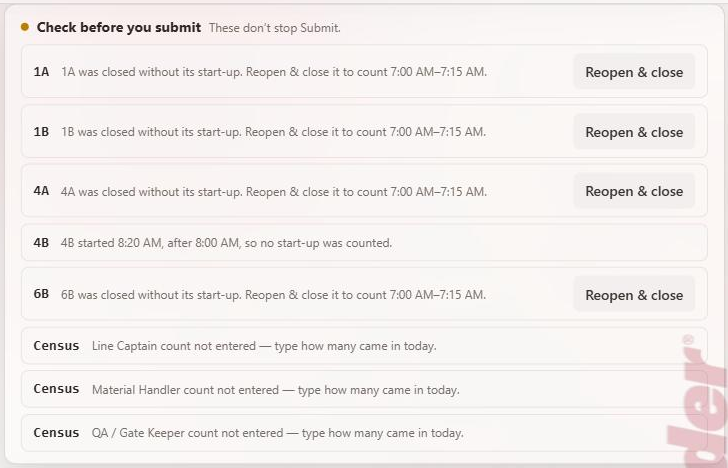
If the automatic close-out finds a line closed without its start-up, it does not submit the day. Its email says which line to Reopen & close.
6. Start-up hours and your rates
Start-up minutes × the first PO's crew = its start-up hours.
- In: posted hours (Hour Tracker), labor, the role table, cost, the bill, the Daily Synopsis Total Hours.
- Out: efficiency, units per labor hour, units per assembly hour, CPLH and productivity. Nobody builds during start-up, so it would only drag the rate down.
8 people, first PO started at 7:15. Line time 6h 45m after lunch = 54.00 hours. Start-up: 15 min × 8 = 2.00 hours, all before the line started. Posted on PO DEMO-SU-3003: 56.0 hours (Fig. 4). Efficiency on Shift Review still divides by the 54.00.
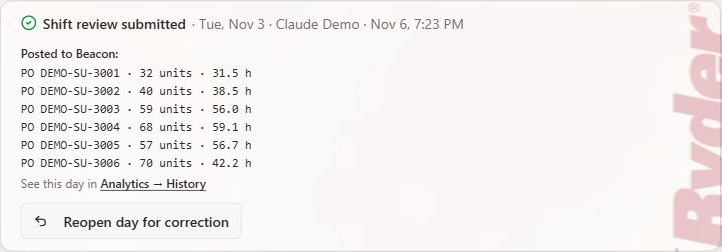
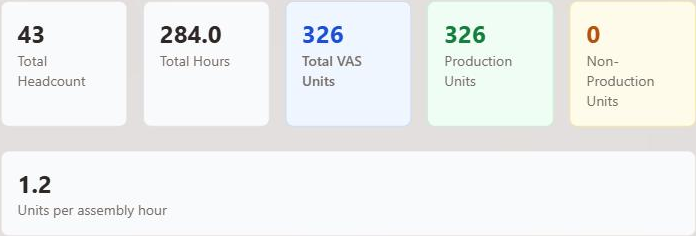
On the Shift Review table, a line's Actual Labor Hours and Efficiency leave start-up out, the same way they leave out unpaid lunch. So the table can read a little lower than the hours posted.
Posted hours and cost go up by the start-up the floor was always paid for but nobody logged. Rates do not move because of it. Week-over-week hours charts that cross the start date are not like for like.
7. Turning it off, and days before
- Off, or a day not picked: lines close and post exactly as before. Shift Review shows no start-up notes.
- Days before the setting was on: unchanged. Nothing is recounted unless you reopen and close a line.
- A line closed while it was on keeps its start-up even if you turn it off later. Reopen & close it to drop it.
8. Questions
Why does a line that started at 7:41 still get 15 minutes?
Everyone on the floor at 7:00 is paid for start-up, whichever line they go to and whenever it starts. The latest start (8:00) is the cut-off for people who were not in yet.
A changeover happened inside 7:00–7:15. Is that counted twice?
No. Measured changeover minutes stay changeover. Start-up only takes the minutes left.
We logged downtime between 7:00 and 7:15. Does start-up get smaller?
No. Downtime is saved for the whole hour, so Beacon cannot tell which minutes it was. Start-up still counts the full window.
Do leads have to do anything?
No. Run the line and close it as usual.