Beacon how-to · November 2026
The Monthly Excel file: hours and labor cost only
The Monthly Synopsis's Export to Excel now gives every site the same columns: hours, cases and labor cost. Its Billed and Margin columns are gone. At a site that bills per unit, only Admins and up can export it.
- v2.197.0
1. What changed
The Excel file's last three columns, UNIT PRICE, BILLED REVENUE and MARGIN, are gone. Only a site that bills per unit ever had them.
They used Beacon's own price, locked when an order was first posted, and left out the LTO. So they never matched the Daily Synopsis. The month's margin on the Daily's math is the Cost and margin table: see section 4.
Nothing else in the file changed. A site that bills by cost gets exactly the file it got before.
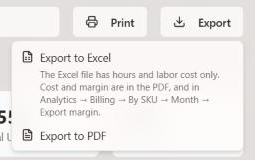
An Admin sees a line under Export to Excel that says where the money is now (Fig. 1).
2. Who can export it
| Site | Admin, Executive, Super Admin | Coordinator, Line Captain, Lead, Worker, Viewer |
|---|---|---|
| Bills per unit | Yes | NoThe item is not in the menu, and Beacon refuses the file if it is asked for another way. |
| Bills by cost | Yes | YesAs before. |
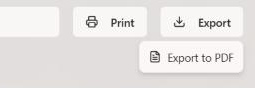
Below Admin at a site that bills per unit, the Export menu has Export to PDF only (Fig. 2). That PDF has no Cost and margin table; its Labor Costs tiles are the same as on screen.
3. What is in the file
One row per PO that had hours posted in the month, sorted by PO, then a TOTALS row.
- START DATE, COMPLETION DATE, INTERNAL ORDER NUMBER (the PO), CUSTOMER, ITEM NUMBER, JOB TYPE, DESCRIPTION.
- QTY COMPLETED and TOTAL CASES.
- DIRECT LBR HRS, TEMP LBR HRS and INDIRECT LBR HRS (Ryder leads), each with its cost at the site's average rates.
- TOTAL LABOR COST and COST PER CASE. COST PER CASE is the last column.
4. Cost and margin for a month
Both use the Daily Synopsis's math, so a month is its Dailies added up. The PDF's Cost and margin table is for Admins and up, at a site that bills per unit. By SKU's Export margin is for Leads and up, unless their Costing is set to No access.
As a PDF
- Open History, click Synopsis, then Monthly Synopsis.
- Pick the month.
- Click Export, then Export to PDF. The Cost and margin table has one row per SKU.
As a spreadsheet
- Open Analytics, click Billing, then By SKU.
- Click Month and pick the month.
- Click Export margin. The file has Planned Cost, Actual Cost, Customer Billing Cost and both margins per SKU.
5. Messages you may see
If the file cannot be made, a red Excel export failed box shows one of these:
| Message | What to do |
|---|---|
| “Admin access required to export the Monthly Synopsis to Excel at a site that bills per unit.” | Your role is below Admin at a site that bills per unit. Use Export to PDF, or ask an Admin for the file. |
| “Could not read this site's rates. Try again.” | Beacon could not reach the server for the site's rates, so it made nothing. Try again in a minute. |
| “The Excel file could not be made. Try again, or use Export to PDF.” | Something else went wrong. Try again. Export to PDF still works. |
6. Check it yourself
For an Admin at a site that bills per unit.
- Open History → Synopsis → Monthly Synopsis and pick a month with posted work.
- Click Export. The line under Export to Excel matches Fig. 1.
- Click Export to Excel and open the file. The last column is COST PER CASE.
- Click Export → Export to PDF. The Cost and margin table is in it.