Beacon how-to · November 2026
Line time starts at Start Line
A line's time now runs from the moment the lead taps Start Line, not from the first pallet. The minutes spent building the first pallet are counted and charged.
- v2.179.0
Screenshots are from Beacon's test site. DEMO-3301 to DEMO-3305 are demo orders.
1. Patch notes
v2.179.0 Nov 2026
- A line's time starts at Start Line. Before, it started at the first pallet tap, so the time to build the first pallet was never charged. More
- A line whose pallets were all tapped at close now posts its hours and its units. Before, it posted nothing.
- Shift Review has two new checks: a first count more than an hour after Start Line, and a line closed with 0 units. They never stop Submit. More
- Morning start-up minutes are still counted once. More
- Days already closed do not change.
2. What was wrong
Beacon started a line's clock at its first activity: usually the first pallet tap. The crew is stated at Start Line and starts working then, so everything between Start Line and the first tap was posted nowhere.
The worst case was a lead who tapped every pallet at close. The line got 0 minutes, so its hours and its units were held back from posting.
On the live site, 21 of 53 lines since mid-October had their first tap after Start Line, by 11 minutes typically and 80 at most. That is about 40 person-hours over the five days that were posted.
3. What you see now
3aClosing a line
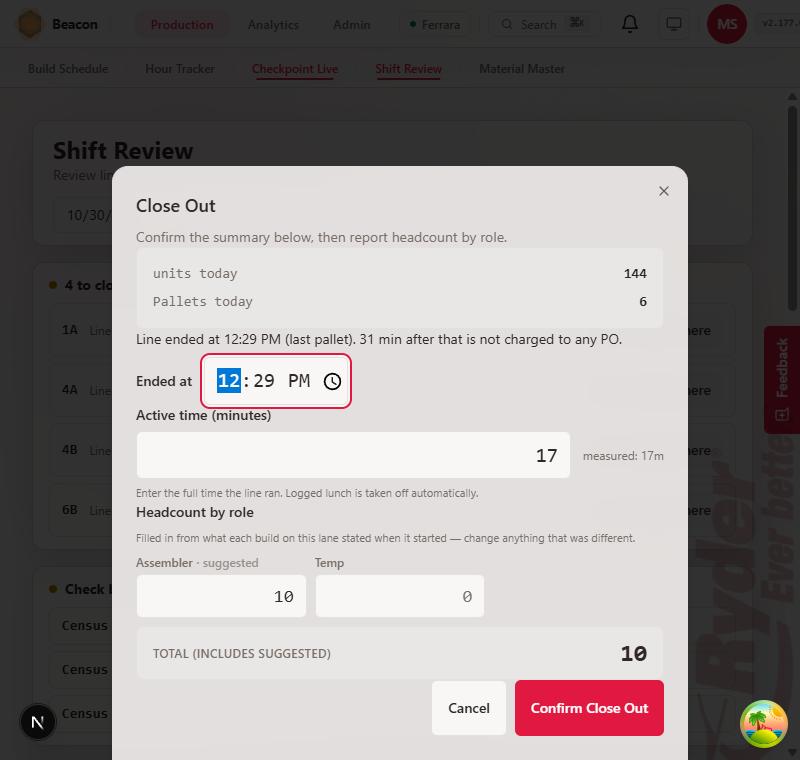
The close dialog's measured time counts from Start Line. Demo line 6B tapped Start Line at 12:12, then all 6 pallets at 12:29, and closed. It now measures 17 minutes. On the old build it measured 0.
3bShift Review and posting
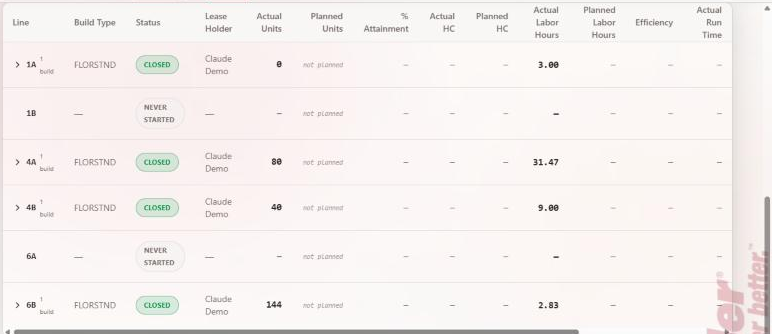
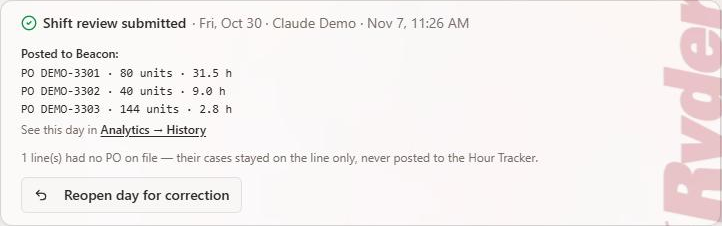
Each line's Actual Labor Hours uses the time from Start Line. Submitting posts those hours, and the units with them.
3cThe tablet
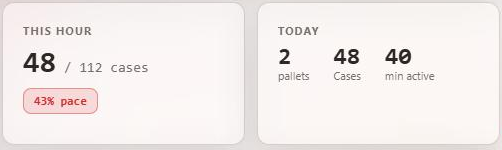
The console's min active also counts from Start Line, so the lead and Shift Review show the same number.
4. Two new checks
Both show under Check before you submit. Neither stops Submit.
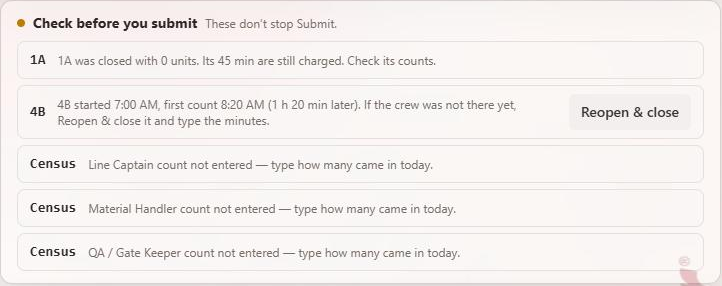
First count more than an hour after Start Line
Start Line now starts the clock, so a Start Line tapped before the crew arrived charges the wait.
- If the crew really was working (set-up, a slow first pallet), leave it.
- If they were not there yet, press Reopen & close on that row.
- In the close dialog, type the real minutes in Active time (minutes) and confirm.
A line closed with 0 units
The line ran, so its time shows, but nothing was counted. Usually the pallets were never tapped. Check the counts with the lead before you submit. The message reads 1A ran 45 min and was closed with 0 units. Check its counts.
5. Morning start-up
Morning start-up (7:00–7:15 at sites that use it) is still counted once per line. Only its label moves:
| Start Line 7:04, first pallet 7:20 | Before | Now |
|---|---|---|
| Line time | From 7:20 | From 7:04 |
| Start-up inside the line's time | 0 min | 11 min (7:04–7:15) |
| Start-up before the line started | 15 min | 4 min (7:00–7:04) |
| Total start-up | 15 min | Same15 min |
The only extra time is 7:15–7:20, when the line was really running. Start-up stays out of efficiency and units per labor hour, as before.
6. Questions
Do days already closed change?
No. A day changes only if a line is closed again (Reopen & close) after this release. On a weekday, a re-close also adds morning start-up if the site uses it.
Why did efficiency drop a little on some lines?
The minutes spent building the first pallet are now in the line's hours. Before, they were missing, so those lines looked slightly faster than they were.
Does this change the bill?
Where a site bills per unit, hours do not move the bill. The bill only changes when a line's units were being held back because it had 0 minutes.
What if something happened before Start Line, like a note or downtime?
The clock starts at whichever came first, so nothing that counted before is lost.
A coordinator typed the minutes at close. Do they change?
No. Minutes typed in the close dialog always win.