Beacon how-to · November 2026
History: SKU first, and cost per unit
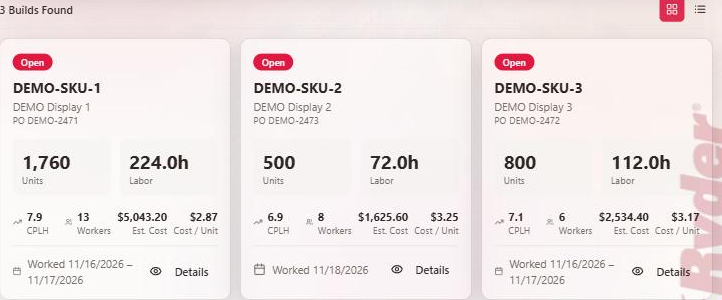
In Analytics → History, each order card now leads with the SKU instead of the PO, and has a new Cost / Unit figure next to Est. Cost. Put a SKU's runs side by side and you can see which one cost more per unit, and then look at why: crew size, downtime, changeovers.
- v2.199.0
Screenshots are from Beacon's test site. DEMO-SKU and DEMO PO numbers are demo data.
1. Patch notes
v2.199.0 Nov 2026
- The SKU is the big number on each card. The PO is still there, in small text under the description. See it
- New: Cost / Unit. The card's estimated labor cost divided by its units, for the dates you picked. How it's worked out
- List view and Export CSV have it too. A Cost / Unit column right after Est. Cost. Details
2. The order cards
- Open Analytics → History.
- Pick your dates and click Apply.
- Scroll down to the order cards.
How Cost / Unit is worked out
Cost / Unit = Est. Cost ÷ Units, both from the same card.
Example: DEMO-SKU-1 cost $5,043.20 for 1,760 units. $5,043.20 ÷ 1,760 = $2.87 per unit.
Both numbers count only the days in your date range. If an order ran 11/16 to 11/17 and you pick only 11/16, the card shows the cost and units for 11/16, and the cost per unit for that day. It never divides part of the cost by the whole order's units.
If no units were posted in your dates, Cost / Unit shows “—”.
If an order has no SKU saved on it, the card shows the PO as the big number, as before.
3. Compare one SKU's runs
- Pick a date range wide enough to hold the runs you want, for example Last 30 Days.
- Type the SKU in the search box at the top. Only that SKU's cards are left.
- Read across the Cost / Unit on each card. The highest one is the run that cost the most per unit.
- Compare that card's Workers and CPLH with a cheaper run. For the downtime and changeovers behind it, click Details.
Example: if one run of a SKU shows $3.25 per unit and another shows $2.87, the first cost about 38 cents more per unit. With 13 workers and a CPLH of 7.9 on the cheaper run, check whether the dearer one had more people on the line, a lower CPLH, or more downtime in Details.
4. List view and Export
Click the list button at the top right of the cards to see the same orders as a table. Cost / Unit is the column right after Est. Cost.
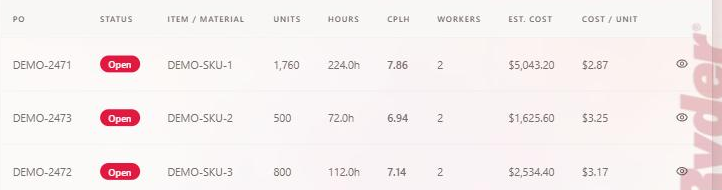
If you've set up your own columns before, Cost / Unit is added for you. If you moved Est. Cost, the new column may sit somewhere else; move or hide it in View.
Actions → Export CSV also has a Cost / Unit column after Est. Cost.
5. Questions
Is this the cost the customer is billed?
No. It's Beacon's estimated labor cost for the hours posted, the same as Est. Cost. For billing and margin, use Analytics → Billing → By SKU.
Can I still find a card by PO?
Yes. The PO is on every card under the description, and the search box still finds a PO.
Why did a card's cost per unit change when I changed the dates?
The card counts only the days in your range. A different range can hold different days of the same order, so its cost and units, and the cost per unit, change with it.