Beacon how-to · November 2026
Build Schedule fixes: tiles, Export, and duplicate orders
The tiles at the top of Build Schedule now count exactly the rows in the list, and they always add up. Export writes those same rows. And Beacon won't let you add an order that is already open on the schedule.
- v2.181.0
Screenshots are from Beacon's test site with demo data. The version number is set when this ships.
1. Patch notes
v2.181.0 Nov 2026
- The tiles follow the Status filter. Before, they counted the week tab and the search but ignored the Status filter. More
- New tile: Pending / Allocated. Pending and Allocated orders were in Total Orders but in no status tile, so the tiles didn't add up. Now they always add up to Total Orders.
- Export writes the rows you see: the week tab, the Status filter and the search. Before, it always wrote every order in every week.
- The same PO and item can't be added twice. If an open order already has that PO and item, Add Order and Edit Order stop and tell you which order it is. More
2. Tiles and Export follow your filters
Where: Build Schedule → Customer Orders. Who: everyone who opens Build Schedule.
BeforeThe tiles and the list disagreed
- If you unticked a status, the rows went away but the tiles still counted them.
- Pending and Allocated orders counted in Total Orders but in no other tile. At one site with mostly Pending orders, the status tiles added up to 7 out of about 250.
- Export always wrote the whole schedule, whatever the screen showed.
NowTiles, list and Export count the same rows
The tiles count exactly the rows in the list: the week tab, the Status filter and the search. The status tiles are In-Process, On-Hold, Closed (Closed and Completed), Open and Pending / Allocated. They always add up to Total Orders.
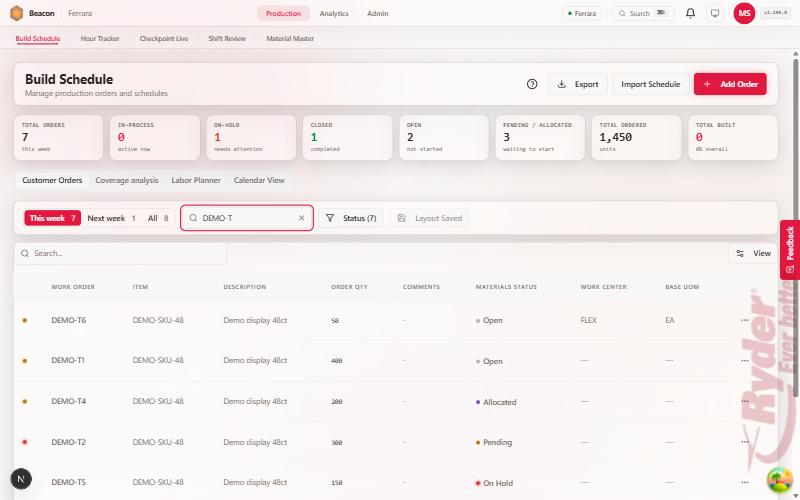
- Open Build Schedule. The tiles count the tab that is open, usually This week.
- Click Status and untick a status, for example Pending. The rows go away and the tiles drop by the same number.
- Click Export. The Excel file has the same rows as the list.
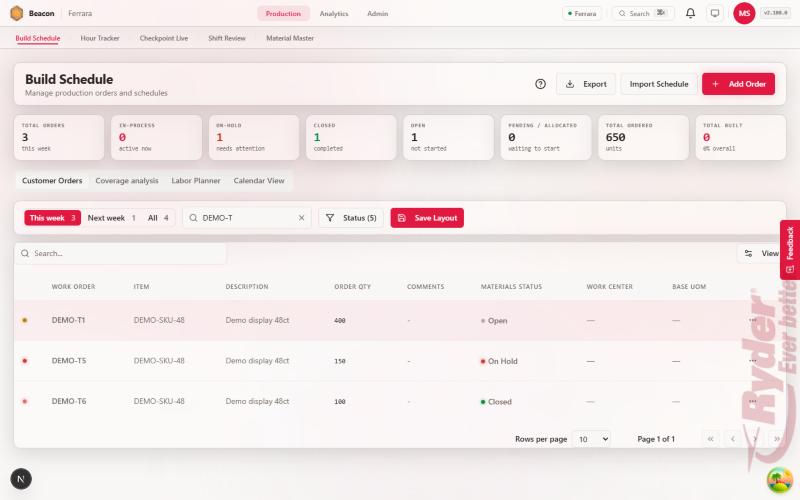
When the search or the filters match nothing, the tiles stay on screen and show 0, and Export is greyed out.
3. The same order can't be added twice
Where: Add Order and Edit on Build Schedule. Who: anyone who adds or edits orders.
BeforeTwo rows for one order
You could add a second order with the same PO and the same item while the first one was still open. Both rows counted in Total Ordered, and the Labor Planner counted the planned units against each row, so planning one order made both look done.
NowBeacon stops and names the order that is already there
When an open order already has that PO and item, Create Order stops. A red message under Work Order gives that order's status, quantity and due date. Upper and lower case and extra spaces don't matter: demo-t1 matches DEMO-T1.
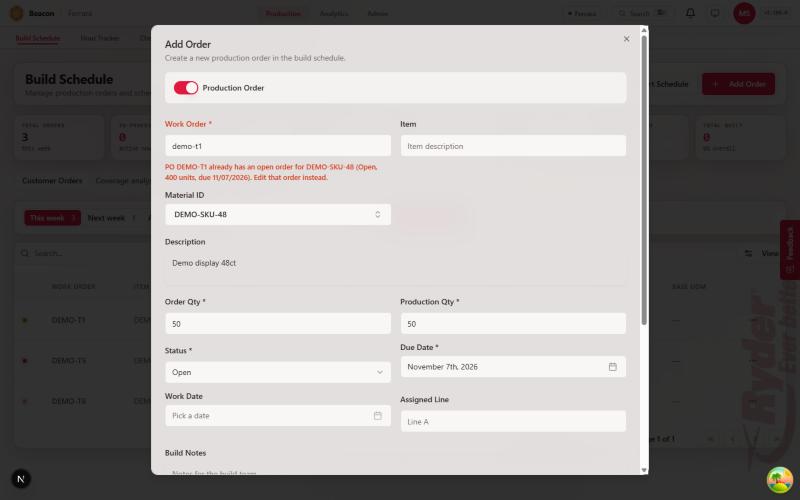
- Read the message. It names the order that is already on the schedule.
- Click Cancel, then search for that PO.
- To build more, open that order with Edit and raise its quantity.
- If that order is finished, close it first. Then you can add the new one.
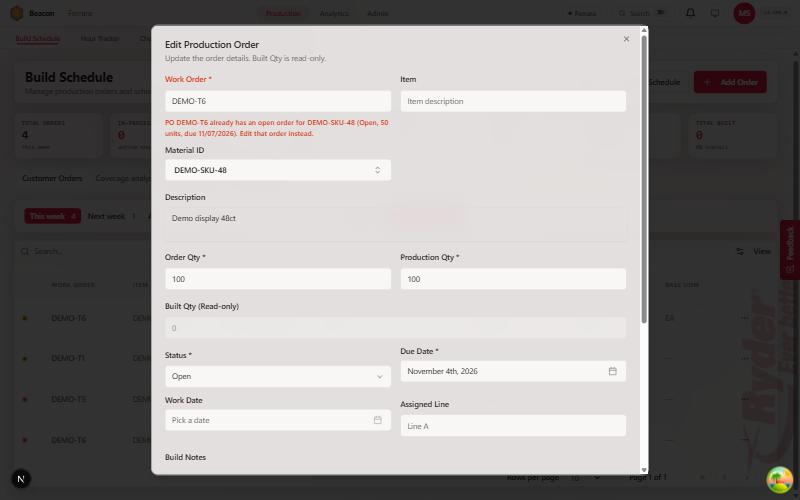
Edit Order checks the same thing. Changing an order's PO or item onto an open order is refused. So is reopening a Closed order while a newer open order has the same PO and item.
A new order next to a Closed or Completed one with the same PO and item. Close the old order, then add the next one.
Two non-production jobs on the same PO. They have no item to compare.
4. Questions
Do the numbers on the tiles change?
Only when you have a status unticked, or when Pending or Allocated orders are in the tab. With every status ticked, Total Orders, Total Ordered and Total Built are the same as before. Pending and Allocated orders now have their own tile.
Does my saved layout still work?
Yes. Save Layout still saves your statuses and week tab, and the page opens on them. The tiles now follow those statuses too.
Are there duplicate orders on our schedule now?
No. On Nov 7, no site had two open orders with the same PO and item. Nothing needs to be cleaned up.
What about Import Schedule?
No change. An upload already skips any row whose PO is still on an open order. The preview lists those rows under Skipped.
It says it couldn't check the PO.
Beacon checks the PO against the live schedule before it saves. If the connection is down, it says Couldn't check the PO
and saves nothing. Try again when you're back online.